Lead Management Template for Organized and Efficient Lead Tracking
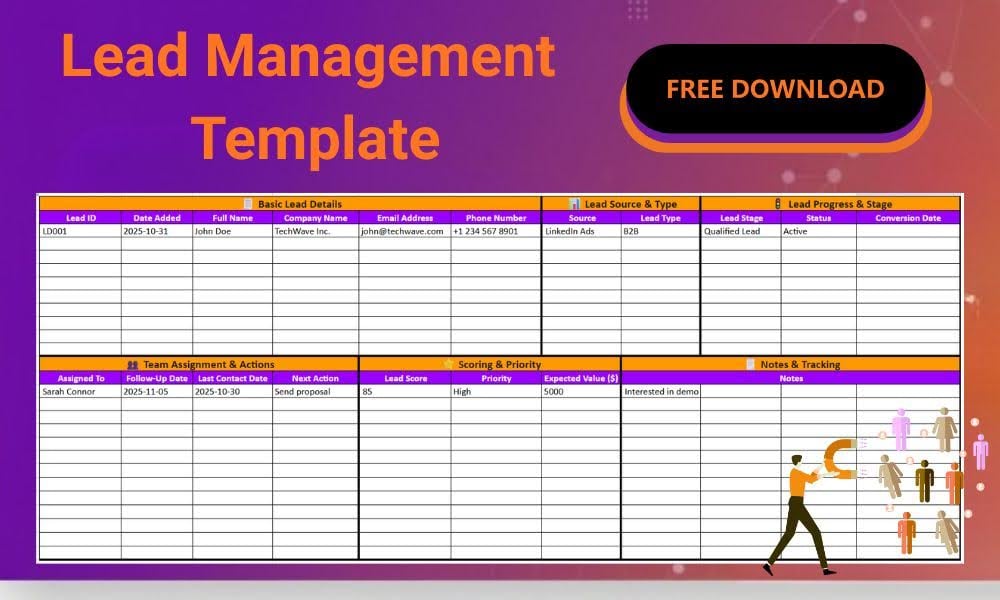
Managing leads effectively requires more than just collecting names and contact details; it depends on maintaining clarity across multiple touchpoints.
This content explains how the template simplifies that process, helping teams document, evaluate, and track leads effectively from first contact to conversion.
Here’s what you’ll learn throughout the article:
- Key sections of the template and their role in lead tracking
- How structure improves clarity, consistency, and teamwork
- Roles and departments that benefit most from using it
- Customizing the Excel sheet for your workflow
- Turning consistent data entry into actionable insights
Download the free template to centralize your process and maintain clear, data-driven visibility across your sales journey.
DOWNLOAD YOUR FREE TEMPLATE HERE
What’s Inside the Free Lead Management Excel Template: Simplifying Every Step of Lead Organization
This section outlines the key parts that make the template functional and efficient. Each area is designed to help teams capture, organize, and monitor leads with clarity and structure, offering a practical view of how data flows across the sales process.
Basic Lead Details
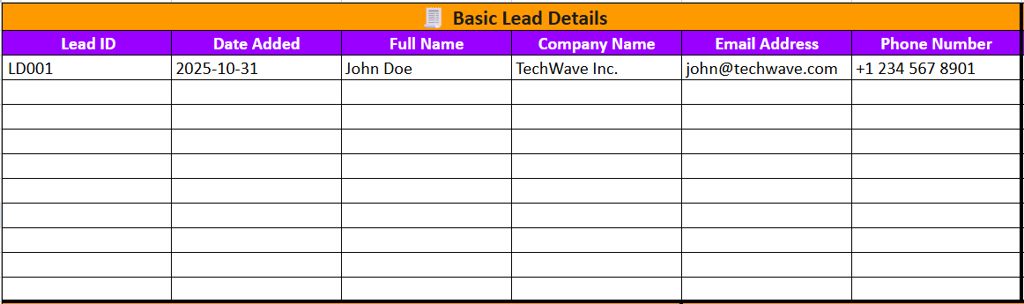
The foundation of the template for lead management lies in its ability to record essential information accurately. These fields make it easy to identify each lead and maintain consistent records across your database.
- Lead ID and date fields ensure accurate tracking from the start.
- Contact details like name, email, and phone simplify communication.
- Company information keeps the business context visible for every interaction.
Lead Source & Type

Understanding where leads come from is key to refining marketing strategies. This section of the template helps pinpoint the origin of each lead and its classification for better targeting.
- Identify marketing channels that bring high-quality leads.
- Distinguish between B2B and B2C audiences for tailored follow-ups.
- Analyze how lead origins align with conversion outcomes.
Lead Progress & Stage
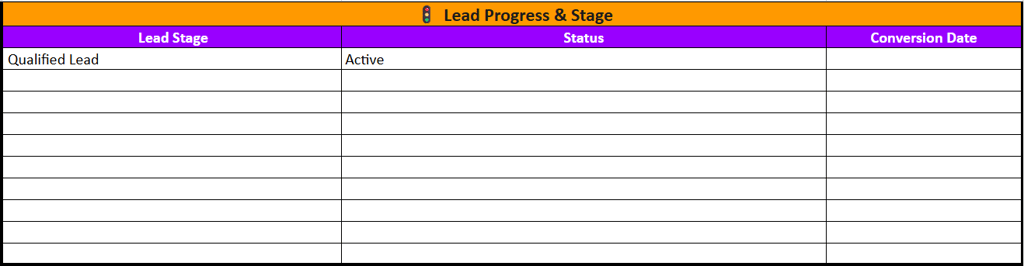
Tracking a lead’s journey helps teams stay aligned on progress. This part of the sheet highlights where each lead stands within your sales funnel for clearer visibility.
- Define each sales stage from new contact to conversion.
- Track status updates to ensure no lead is overlooked.
- Log conversion dates to measure response efficiency.
Team Assignment & Actions
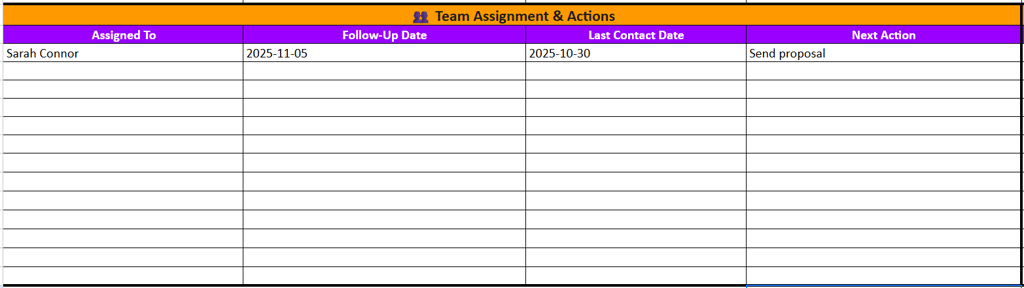
Collaboration is simplified when responsibilities are clearly defined. This area ensures that every lead has an assigned owner and an actionable next step for smooth coordination.
- Assign leads to team members for accountability.
- Set follow-up dates and actions for timely engagement.
- Record communication details to maintain workflow transparency.
Scoring & Priority
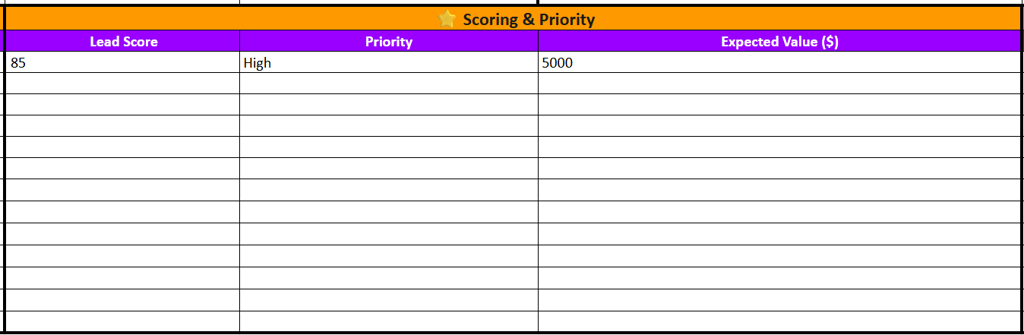
This section focuses on ranking leads based on potential value. By setting clear scoring criteria, teams can focus their efforts where they matter most.
- Use lead scores to identify high-potential prospects.
- Set priority levels that match conversion readiness.
- Estimate the expected value to forecast possible revenue.
Notes & Tracking
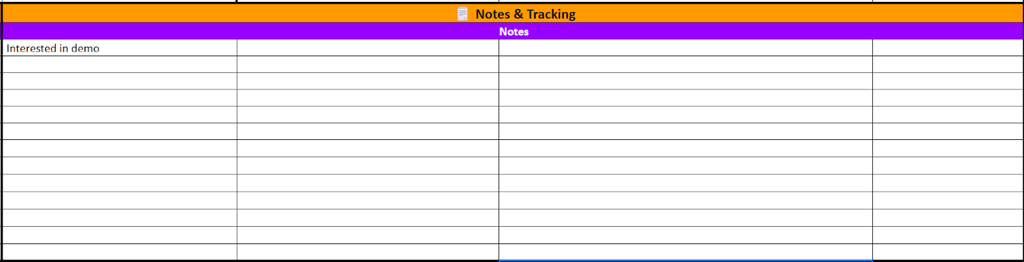
The final section of this Excel template for lead management captures context that numbers can’t convey. Notes ensure that insights, preferences, and interactions are properly documented for future reference.
- Record observations that support personalized engagement.
- Add reminders for specific needs or follow-up topics.
- Keep a trail of interactions for reference during reviews.
What Purposes Does this Excel Lead Management Template Serve?

A structured framework allows teams to maintain consistency in how they capture, review, and update lead information.
With all data arranged in clear sections, the template minimizes confusion and ensures every stage of the lead journey is recorded uniformly. This structure supports smoother collaboration and more reliable reporting across departments.
- Centralized data keeps all lead information accessible and organized.
- Categorized fields simplify filtering and performance analysis.
- Consistent updates reduce duplication and improve record accuracy.
- Clear tracking enhances visibility into ongoing interactions.
Overall, the template creates a reliable structure that helps teams focus on relationships rather than administration. Its organized design supports better decision-making and long-term process efficiency.
Who Can Benefit from Using This Template

A well-structured template is not limited to one department; it supports multiple roles involved in managing customer relationships. From sales and marketing teams to business leaders, the format ensures that everyone works from the same source of truth, improving collaboration and data consistency across the organization.
Sales Teams
Sales professionals can use the template to monitor progress at every stage of the pipeline. It allows them to set reminders, document next steps, and maintain full visibility over follow-ups for each lead.
Marketing Specialists
Marketers can analyze lead sources to understand which campaigns generate the most qualified leads. This visibility helps refine strategies, allocate budgets effectively, and measure channel performance over time.
Managers and Executives
Management teams rely on the template to evaluate team productivity, track conversion rates, and assess revenue potential. It provides a clear overview that supports better strategic planning and performance reviews.
Customer Support Staff
Support teams can reference notes and communication history to deliver consistent, informed interactions. Having a complete record of lead details ensures smoother handovers and a more personalized customer experience.
Customizing the Template for Different Workflows

The lead management Excel template free download is designed with flexibility in mind, allowing teams to modify columns, categories, and data points to align with their specific workflow requirements. This ensures that the template remains relevant as operations evolve.
There are several ways teams can adjust the template to fit their working style:
- Add new columns for metrics like campaign IDs or product interests.
- Rename categories to match internal sales stages or funnel models.
- Integrate automation or formulas for lead scoring and reporting.
- Adjust visuals such as color coding for improved readability.
Using the Template to Build Insightful Lead Reports
Consistent data entry turns this template into a valuable reporting tool that highlights patterns, progress, and performance across all leads.
By organizing information methodically, teams can generate insights that guide strategy, refine processes, and measure success with greater clarity and confidence.
Schedule regular reviews of your lead data each week or month to spot trends early and adjust your approach. These quick check-ins help turn your tracking process into a steady source of data-driven decisions.