

A packing slip seems like a small piece of paper, but it carries real weight. It tells the customer what’s inside the box, gives your fulfillment team a fast way to check an order, and quietly builds trust every time a package matches what was promised. Skip it, or get it wrong, and the fallout usually shows up in return requests and confused support tickets.
This guide covers where to grab a ready-made template, when you actually need one, and how to customize it without running into Amazon’s own rules on what a package can and can’t include.
What’s Inside a Packing Slip Template
An Amazon packing slip is a short, standardized document that rides inside the box: who it’s going to, what’s in it, and how much each item costs. It’s not the same as an invoice, and enforcement is inconsistent across sellers, but most treat it as standard practice anyway because it removes guesswork on both ends and gives every order a consistent, professional finish.
You can download the free, editable version of this template using the button on this page. It’s a Google Sheet; once it opens, go to File, then Make a Copy, and it’s yours to edit.
The layout keeps things simple:
- Billing and shipping address blocks
- Order date and order number
- A line-item table for quantity, item, price, and total
- A short return policy note at the bottom
Keeping this data accurate ties back to your product catalog. Pairing the template with effective SKU rationalization keeps stock information clean enough that the slip always matches what’s actually in the box, and a clear return policy line helps streamline the return process if a customer needs to send something back.
Here’s an example of one filled out, field by field:
| Field | Sample Entry |
|---|---|
| Order Date / Order Number | July 8, 2026 / 111-2345678-9012345 |
| Shipping Address | Jane Carter, 84 Maple Ridge Dr, Huntsville, AL 35801 |
| Qty | 2 |
| Item | Stainless Steel Water Bottle, 24oz |
| Item Price | $18.99 |
| Total | $37.98 |
| Return Policy | Returns accepted within 30 days, unused, in original packaging |
Nothing fancy, but every field on that list answers a question a customer might have before they even think to ask it.
Why a Packing Slip Actually Matters
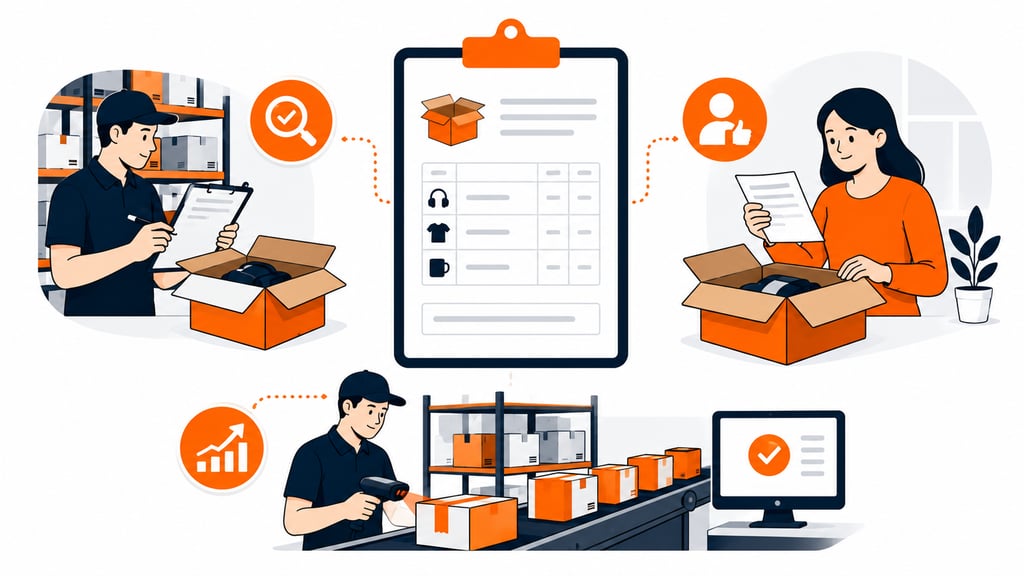
A packing slip does real work in three places, not just one:
- Order verification: before a box leaves your warehouse, it lets you confirm the contents match what Amazon says was ordered, which cuts down on wrong-item shipments and the refunds that follow.
- Customer confirmation: shoppers get an instant way to check that what they received lines up with what they paid for, which builds trust fast and heads off unnecessary messages to your support inbox.
- Processing efficiency: a clear, well-formatted slip means your team can move through orders without second-guessing what goes in which box. For sellers handling higher volume, Shopify fulfillment services built around this kind of documentation keep pick-and-pack moving.
FBA or FBM: Do You Even Need One?
This is where a lot of sellers get confused, so it’s worth clearing up. If you sell through Fulfillment by Amazon, Amazon packs and ships the order for you, and a seller-made packing slip generally isn’t part of that process since Amazon controls what goes in the box. For a closer look at how this compares across programs, see the differences between FBA, SFP, and FBM.
If you fulfill orders yourself under FBM, that responsibility shifts to you. You’re the one boxing the item, so you’re also the one who needs to drop a packing slip in before it ships. This is exactly where a ready-made template saves time, since you’re not designing one from scratch order by order.
One more thing worth knowing: Amazon’s seller policies restrict using inserts or packing slips to request incentivized reviews, offer discounts in exchange for feedback, or push customers toward buying somewhere off Amazon. A clean, informational slip stays well within the rules; a promotional one can put your account at risk.
Getting a Packing Slip Straight From Seller Central
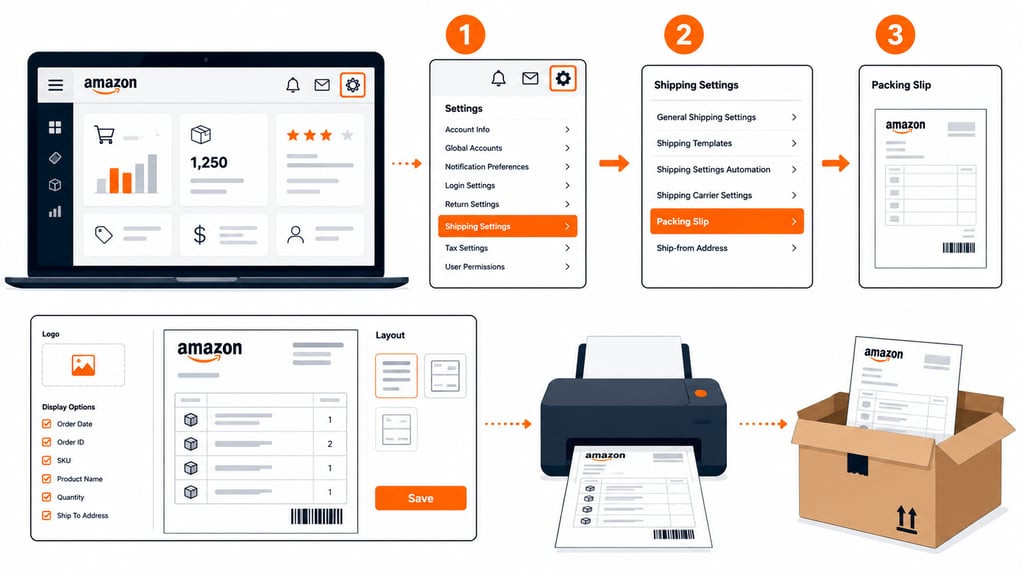
Amazon doesn’t force you to build everything from scratch. Log in to Seller Central, where the dashboard gives you a quick snapshot of sales, inventory, and customer feedback the moment you land on it.
From there, here’s the exact path:
- Open the Settings tab in the top right corner.
- Choose Shipping Settings from the dropdown.
- Select Packing Slip from the list.
Once you’re in, you can adjust the layout, add your logo, and choose what order details print. Amazon can also generate slips automatically per order, which saves time if you’re shipping in volume and would rather not build one by hand for every sale.
Branding Your Own Template the Right Way
Sometimes the built-in Amazon tool is enough. Other times you want something that looks unmistakably like your brand, and building your own gives you that control.
A few adjustments make the biggest difference:
- Logo and header: instantly recognizable, and it takes the slip from generic to branded.
- Colors and fonts: match your storefront so the experience feels consistent from click to unboxing.
- A short thank-you note or care instructions: a warm, neutral message works; steer clear of discount codes tied to reviews and anything that points customers to buy off Amazon, since both cross lines Amazon actively enforces.
Keeping real-time inventory tracking in the loop also helps, since a packing slip is only as accurate as the stock data behind it, especially once your design is locked in and running across every order.
Printing and Packing It Correctly
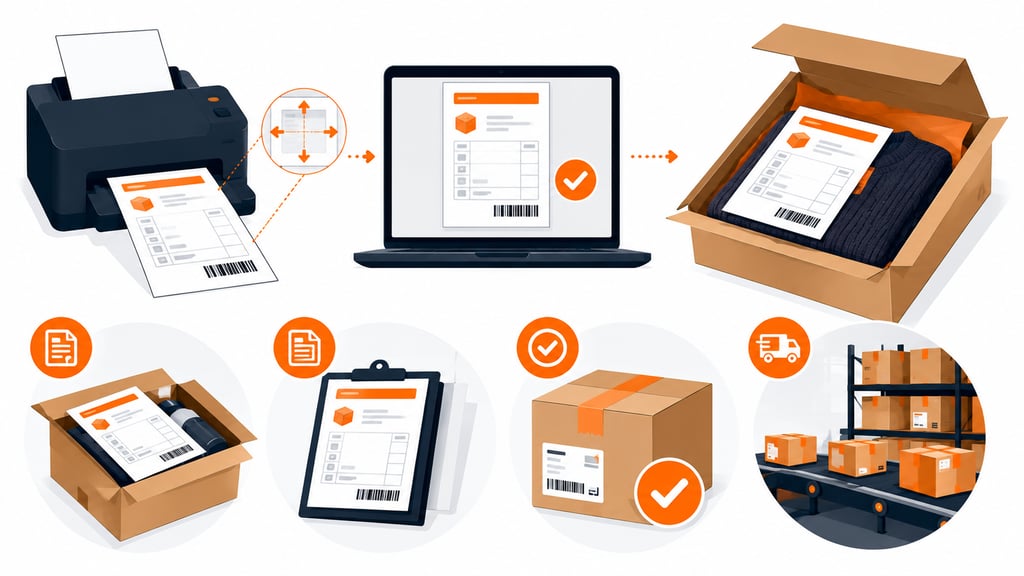
Before printing for real orders, load your printer and run one test copy; check the margins and make sure nothing’s cut off, especially if your template includes a logo or colored header.
Once it’s ready, a few habits help:
- Place it on top of the items, not buried underneath, so it’s the first thing a customer sees
- Keep an extra copy on hand for returns or exchanges
- Treat the slip as a required step for every shipment, not an optional one
Sellers running higher volumes often fold this into a broader system. Reliable e-commerce fulfillment solutions keep packing slip accuracy consistent across hundreds of orders instead of leaving it to chance.
Common Packing Slip Problems and How to Fix Them
Even a solid process runs into snags:
- Missing fields: order info or product details left blank instead of filled in before printing.
- Formatting issues: a slip that looks fine on screen can print oddly; run a test page before a full batch.
- Policy slip-ups: language that asks for a positive review or offers an incentive, which risks more than just a bad first impression.
- Stale templates: a design that hasn’t been reviewed in months, so it no longer matches your current branding.
If something’s still off, Amazon’s seller support team can walk through account-specific issues a generic guide can’t cover.
Download Free Amazon Packing Slip
Start Shipping With a Packing Slip That Works for You
A packing slip is a small detail that quietly protects your brand every time a box ships. Grab the free template above, customize it to match your store, or pull one straight from Seller Central if you’d rather skip the setup, then make it a standard part of every FBM order you send.
If you’d rather hand off fulfillment entirely, Fulfyld runs pick, pack, and ship for growing Amazon and DTC brands, packing slips included as a standard part of the process.
Templates track the work. We do the work.
This file will carry you a long way. But past a few hundred orders a month, tracking fulfillment in a spreadsheet becomes the bottleneck. That is the point of a 3PL: Fulfyld picks, packs, and ships every order under a formal SLA with automatic credits, one flat all-inclusive per-order price, and a dedicated account manager who knows your catalog.
Get a real quote