

Every sales team collects leads a little differently, which makes it hard to tell who’s actually following up and who’s letting contacts go cold. A tracking template built for lead management gives you one consistent format to log source, stage, owner, and next steps, so the whole team works off the same record instead of scattered notes and memory.
Whether you’re onboarding new reps, cleaning up a messy pipeline, or just tired of leads slipping through the cracks, breaking the process into clear fields shows you exactly where each contact stands before you lose them to silence.
What Is a Lead Generation Template in Excel?
A lead generation template in Excel is a structured spreadsheet built to capture, sort, and track every prospect from first contact through close. Instead of scattered notes or an inbox full of half-remembered conversations, it gives your team one shared file with defined columns for contact info, source, stage, and next steps.
Think of it as a lightweight stand-in for CRM software: no new platform to learn, no monthly fee, just a ready-made spreadsheet for organizing sales leads that any rep can open and update in seconds. The structure is already built in; you fill in the fields, and the tracking takes care of itself.
A few reasons teams reach for it first:
- Free to download, available as a Google Sheet, and exportable to Excel
- No new software license or installation required
- Works for a solo rep or a full sales team alike
What’s Inside This Free Lead Tracking Spreadsheet
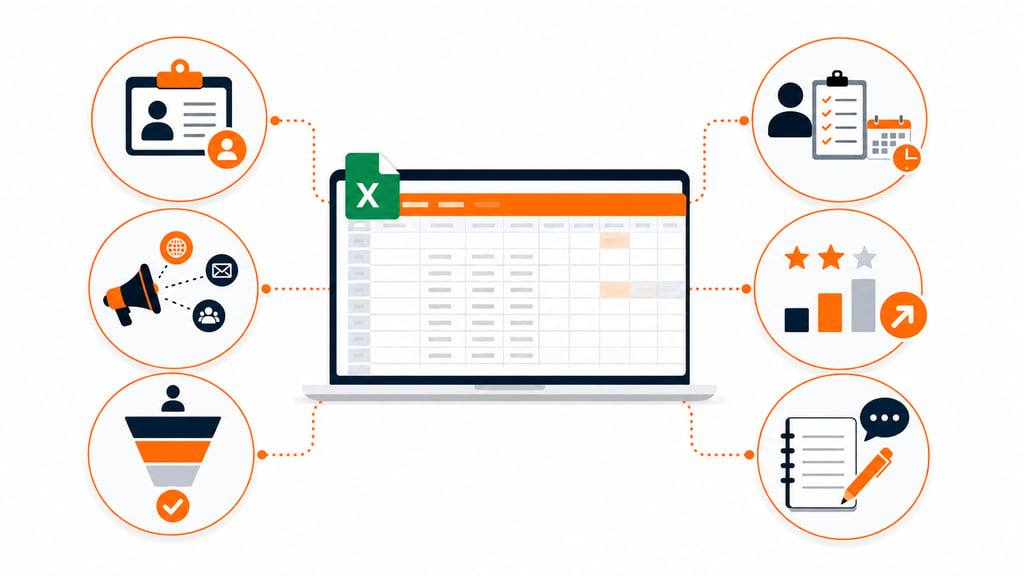
This isn’t a blank grid you have to figure out on your own. It’s an Excel template built with six sections, each one covering a different stage of the lead’s life, from first contact to close. Here’s what each part does.
Basic Lead Details
Every reliable record starts with the basics, captured the same way, every time. These fields make each lead easy to identify and keep your database from turning into a mess of duplicates and typos.
- Lead ID and date fields lock in accurate tracking from day one.
- Contact details, meaning name, email, and phone, keep follow-up simple.
- Company info keeps the business context visible at a glance.
Lead Source & Type
Knowing where a lead came from shapes how you follow up and where you spend your next marketing dollar. This section pins down the origin of each lead and sorts it for smarter targeting; see our take on what counts as a good ROI for ecommerce for context on why source tracking matters.
- Spot the marketing channels actually bringing in quality leads.
- Separate B2B from B2C contacts so follow-ups match the audience.
- Match lead origin against conversion outcomes to see what’s working.
Lead Progress & Stage
A lead that stalls out silently costs you money. This part of the sheet shows exactly where each contact sits in the sales funnel, so nothing slips through unnoticed.
- Map each sales stage, from first contact through close.
- Log status updates so no lead gets forgotten.
- Record conversion dates to measure how fast your team actually responds.
Team Assignment & Actions
Nothing dies faster than a lead nobody technically owns. This section assigns a person and a next step to every single contact.
- Assign leads to specific team members for real accountability.
- Set follow-up dates and next actions so timing doesn’t slip.
- Log communication history to keep workflow transparency intact across the team.
Scoring & Priority
Not every lead deserves the same attention. This section ranks leads by potential value, so reps spend their limited hours on the contacts most likely to close instead of chasing everyone equally.
Notes & Tracking
Numbers don’t capture everything. This last section holds the context and preferences, the “call back after their busy season” details that a spreadsheet column can’t hold on its own.
- Log observations that make future conversations feel personal.
- Add reminders for specific requests or topics to revisit.
- Keep an interaction history on hand for reviews and handoffs.
Stop Losing Leads: How This Template Saves Your Team Time
A structured sheet keeps everyone capturing data the same way, which sounds small until you’re the one trying to pull a report from six people’s inconsistent habits.
Because every section follows the same format, there’s less confusion about where information belongs and less duplicate data clogging things up. That consistency is what makes reporting trustworthy instead of a guessing game.
| Benefit | What it means day to day |
| Centralized data | Every lead lives in one place, not scattered across inboxes and notebooks |
| Categorized fields | Filtering and performance analysis take minutes, not hours |
| Consistent updates | Fewer duplicate entries, fewer conflicting records |
| Clear tracking | Full visibility into where each conversation actually stands |
The bigger win is time. Reps spend it building relationships instead of hunting through spreadsheet chaos trying to remember who they promised to call back.
From Sales to Support: Who Should Be Using This Sheet

This isn’t just a sales tool. It supports everyone involved, from the rep on the phone to the executive reading quarterly numbers. Here’s how each group gets value out of the same shared record.
Sales Teams
Reps use it to track exactly where each deal sits in the pipeline. Reminders, next steps, and follow-up dates stay visible so nothing gets dropped between calls.
Marketing Specialists
Marketers dig into lead sources to see which campaigns actually bring in qualified contacts. That data shapes strategy, budget allocation, and which channels get more attention going forward.
Managers and Executives
Leadership uses the sheet to gauge team output, track conversion rates, and estimate revenue potential still in the pipeline. It also feeds directly into performance reviews, giving managers hard data instead of gut feel.
Customer Support Staff
Support reps pull from the notes and history to avoid asking customers to repeat themselves. A full record means smoother handoffs and interactions that actually feel personal.
Making It Fit Your Own Process
No two sales teams work the same way, so this sheet is built to bend. Add columns, drop ones you don’t need, rename categories; it stays useful because the structure underneath doesn’t break when you tweak it.
A few common adjustments teams make:
- Add a deal-value column if revenue forecasting matters more than lead count.
- Split the source field into paid, organic, and referral if your channel mix is complex.
- Color-code priority rows so high-value leads jump out visually.
- Add a region or territory column for teams split by geography.
None of these changes requires rebuilding the sheet from scratch. That’s the point: it flexes without falling apart.
Download Free Template For Lead Generation
Turning Consistent Entries Into Real Reports
A spreadsheet only earns its keep once your team fills it in the same way, every time. That habit turns raw rows into patterns you’d otherwise miss, like a stage where leads keep stalling or a source that’s quietly underperforming.
Set aside time weekly or monthly to review the data together, then adjust before small issues turn into bigger ones.
Managing your sales leads well isn’t about fancier software. It’s about a structure simple enough that people actually use it, and clear enough to tell you something useful when you look back.
Templates track the work. We do the work.
This file will carry you a long way. But past a few hundred orders a month, tracking fulfillment in a spreadsheet becomes the bottleneck. That is the point of a 3PL: Fulfyld picks, packs, and ships every order under a formal SLA with automatic credits, one flat all-inclusive per-order price, and a dedicated account manager who knows your catalog.
Get a real quote