

Picture your last tax season. Now picture doing it again, except every invoice is already sitting in one folder, formatted, numbered, and ready to hand off. That’s the gap between sellers who treat invoicing as an afterthought and sellers who build it into the business from day one.
Amazon doesn’t hand you a polished invoice for every sale. You either cobble one together by hand each time or you set up a template once and reuse it for years.
The second option costs you twenty minutes today and saves you hours every single month after. That’s the trade this guide is here to help you make.
What’s Included in This Amazon Invoice Template
This ready-made template comes fully built for Amazon sellers, not a generic form you have to reshape from scratch. It’s part of Fulfyld’s free template library. Here’s what’s already in it:
- Header: Space for your logo, business name, and tagline
- Seller and buyer info: Your business address plus the customer’s shipping and billing details
- Invoice number and date: A field ready for your own numbering system
- Line items table: Rows for SKU, description, quantity, unit price, and line total
- Subtotal, tax, and total: Pre-built formulas that update as you edit
- Payment terms: A dedicated spot for due dates and accepted payment methods
- Notes: Room for return policies, thank-you notes, or order-specific details
Because it’s a genuine Word format file, every field above is editable the moment you open it, no locked cells, no watermark to strip out, no plugin required. If you also run Amazon FBA or SFP alongside direct sales, the same layout works for both, since the line-item table isn’t tied to one sales channel.
One thing worth flagging: an invoice isn’t the same document as a purchase order. A purchase order requests goods before a sale happens; this template is built for after the sale, when you’re billing a customer or reconciling your own books. If you need the other document too, Fulfyld has a purchase agreement template built the same way.
Does Amazon Already Send Buyers an Invoice for You
Not always, and that’s exactly why this template matters. On UK and EU marketplaces, Amazon’s VAT Calculation Service can auto-generate invoices or receipts for enrolled sellers within 24 hours of an order.
In the US, and for most third-party sellers who aren’t enrolled in that service, no formal invoice gets created automatically. Buyers still ask for one, especially business customers filing expenses.
There’s a second reason to keep one ready. Buyers, accountants, and tax authorities can all ask for proof of a transaction well after a sale closes, and outside the VAT Calculation Service marketplaces, Amazon isn’t holding that record for you. A correctly formatted invoice on file means you’re not scrambling to rebuild one from memory weeks later.
Customizing the Invoice Template
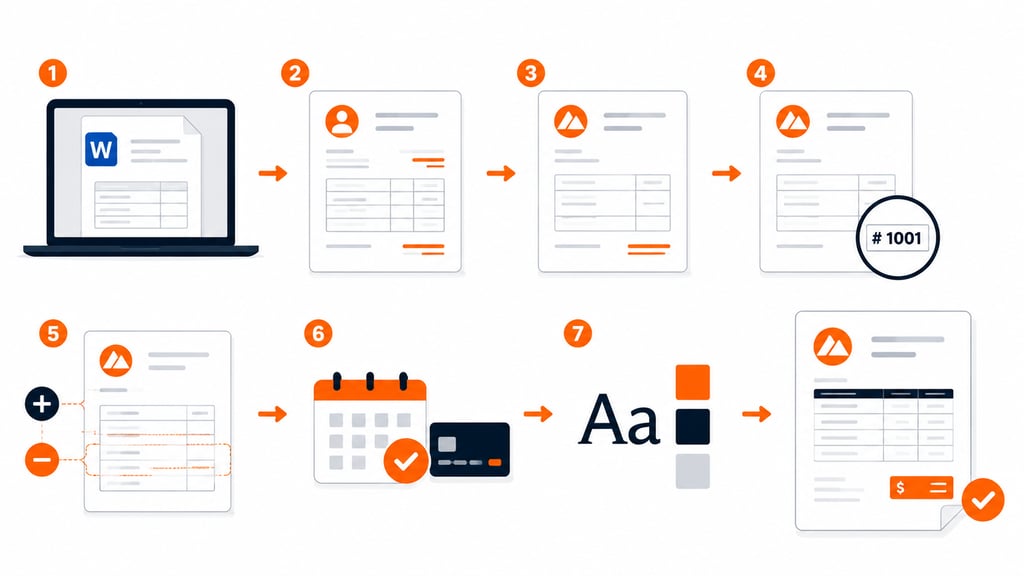
A generic template is a starting point, not a finished product. Work through these steps to make it yours:
- Open it in Microsoft Word (or a compatible editor like Google Docs).
- Replace the sample text with your real business name, address, contact details, and tax ID if you use one. Double-check every field; a wrong digit looks careless on a customer-facing document.
- Insert your logo in the header and resize it so it doesn’t crowd the layout.
- Set your invoice numbering system; sequential works for most sellers, and stay consistent so nothing gets duplicated or skipped.
- Add or remove line-item rows to match your actual order volume and product mix.
- Spell out payment terms and due dates so there’s zero ambiguity about when you expect to get paid.
- Match fonts and colors to your brand. Small, consistent choices here make an invoice look like it belongs to a real company instead of a rushed download. Curious what Amazon’s own invoices use? See the fonts here.
Saving and Storing the Updated Invoice Template
Once customization is done, save it under a clear name; something like “Invoice_Template_Master” beats “Document1.” That way, you never overwrite your original by accident.
Build a dedicated folder
Keep every version in one place. A single invoice templates folder, separate from your general documents, saves you from hunting through old email attachments when you need the file fast.
Back it up to the cloud
If you work from more than one device, or a bookkeeper needs access to it, store the file on Google Drive, Dropbox, or OneDrive. It’s a simple safeguard: if your laptop dies tomorrow, your invoicing doesn’t die with it.
If you’re already a Fulfyld client, pull your own fulfillment invoices from your billing portal too, and keep everything in one place.
Invoice, Purchase Order, or Packing Slip: Which One Do You Actually Need
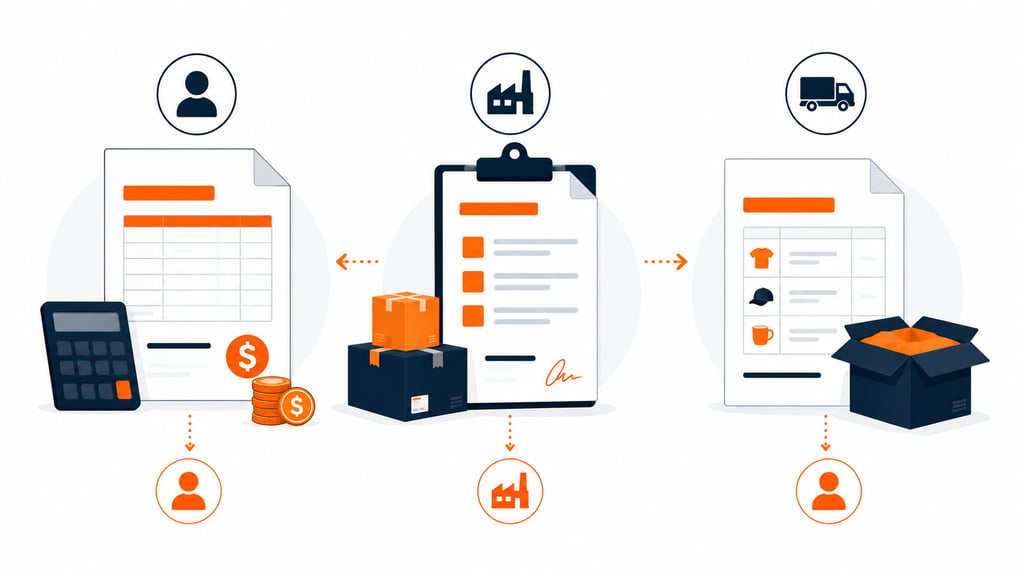
Sellers mix these up constantly, and it causes real bookkeeping headaches. Here’s the quick version:
- Invoice: Sent after a sale, asking to be paid. This is what the template above builds.
- Purchase order: Sent before a sale to a supplier, requesting specific goods at agreed prices. It’s a request, not a bill.
- Packing slip: Ships inside the box, listing what’s physically included, with no pricing on it. Grab our Amazon packing slip template if you need that one too.
If you’re a private-label or wholesale seller, you’ll likely need a purchase order format at some point too, usually when restocking from a manufacturer rather than billing a customer.
Keeping the two documents visually distinct makes it obvious at a glance which one you’re looking at, even months later. Fulfyld has a full breakdown of how purchase orders, invoices, and packing slips relate to each other if you want the complete picture.
Download Amazon Purchase Order Invoice
Stop Rebuilding Invoices From Scratch
A well-built invoice template is basic infrastructure, not a luxury. Grab the file, fill in your real business details, and save it somewhere backed up. That’s the whole system, and it pays off the moment tax season rolls around, and your records are already sorted.
Spend less time rebuilding invoices from scratch. Spend more time running your Amazon business. Happy selling.
Templates track the work. We do the work.
This file will carry you a long way. But past a few hundred orders a month, tracking fulfillment in a spreadsheet becomes the bottleneck. That is the point of a 3PL: Fulfyld picks, packs, and ships every order under a formal SLA with automatic credits, one flat all-inclusive per-order price, and a dedicated account manager who knows your catalog.
Get a real quote