Brett McCleary is Director of Implementation at Fulfyld, where he leads client onboarding and the integrations that connect brands' stores, marketplaces, and systems to Fulfyld's fulfillment operation.
This document will outline detailed instructions for the login process, ensuring seamless access to your invoices and shipping data. Please see below for a direct login link to access your invoices securely.
Please note that the email you use to log in will be the same one you provided when signing up for Fulfyld’s services. If you need to confirm your email on file or update it, please reach out to your Account Manager.
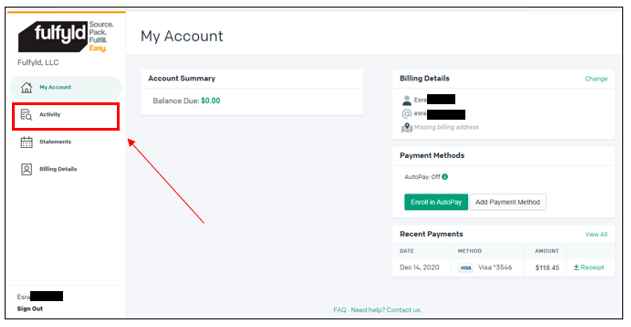
Using the left toolbar, select Activity, shown below:
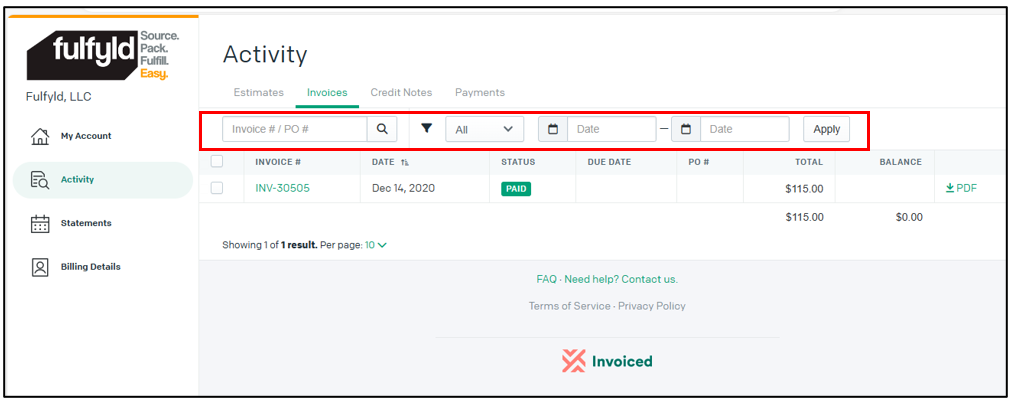
Locate your desired invoice by filtering by any of the following:
Invoice Number
Status
Date
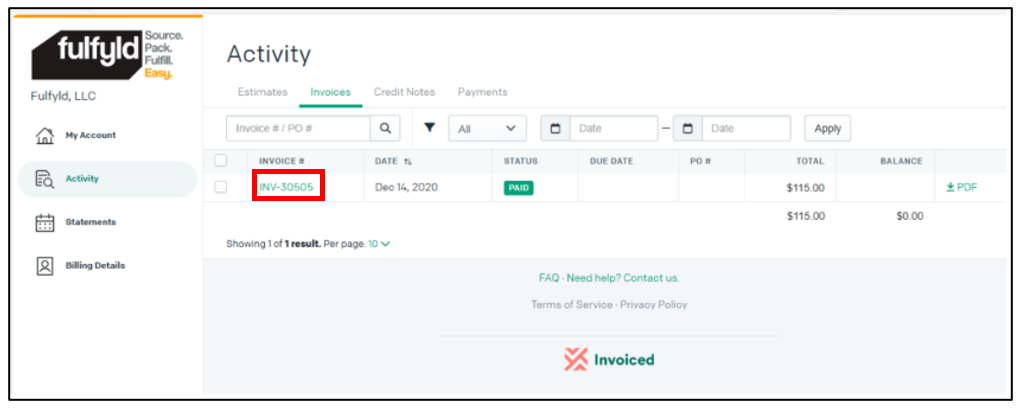
View Invoice details by selecting the Invoice Number link:
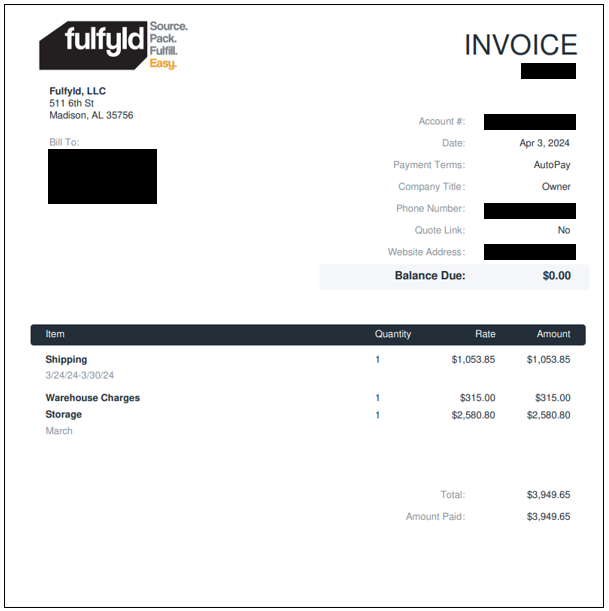
An example of an invoice is shown below:
Invoices show weekly totals for the 4 below categories:
Shipping – Total for all shipping charges within the specified dates. This includes ship costs, surcharges, international customs and duties fees.
Warehouse Charges – Total for any non-shipping fees. This includes returns charges, receiving charges, and special project fees.
Storage – There is a once-a-month fee for storage costs.
Minimum Fee – Each account has a specified monthly minimum that they must ship per month. If this monthly minimum is not met, then at the end of the month, customers will be billed the difference. As an example, if a brand has a monthly minimum of $500 and they only ship $300, they will be billed the remaining $200 at the end of the month.
Frequently Asked Questions
How do I access my invoices in the Fulfyld billing portal?
You can log in to your invoices by visiting https://fulfyld.invoiced.com/login using the email address you provided when you signed up for Fulfyld's services. Once logged in, select 'Activity' from the left toolbar to view your invoices.
What email should I use to log into the Fulfyld billing portal?
You should use the same email address that you provided when you originally signed up for Fulfyld's services. If you need to confirm or update your email on file, contact your Account Manager.
Can I filter invoices by date or status in the Fulfyld portal?
Yes, you can filter your invoices by Invoice Number, Status, or Date to quickly locate the specific invoice you're looking for. You can then click on the Invoice Number link to view the full details.
What should I do if I don't remember my email address for the billing portal?
Contact your Account Manager who can confirm your email on file or help you update it so you can access the Fulfyld billing portal.
Brett McCleary is Director of Implementation at Fulfyld, where he leads client onboarding and the integrations that connect brands' stores, marketplaces, and systems to Fulfyld's fulfillment operation.
To provide the best experiences, we use technologies like cookies to store and/or access device information. Consenting to these technologies will allow us to process data such as browsing behavior or unique IDs on this site. Not consenting or withdrawing consent, may adversely affect certain features and functions.
Functional
Always active
The technical storage or access is strictly necessary for the legitimate purpose of enabling the use of a specific service explicitly requested by the subscriber or user, or for the sole purpose of carrying out the transmission of a communication over an electronic communications network.
Preferences
The technical storage or access is necessary for the legitimate purpose of storing preferences that are not requested by the subscriber or user.
Statistics
The technical storage or access that is used exclusively for statistical purposes.The technical storage or access that is used exclusively for anonymous statistical purposes. Without a subpoena, voluntary compliance on the part of your Internet Service Provider, or additional records from a third party, information stored or retrieved for this purpose alone cannot usually be used to identify you.
Marketing
The technical storage or access is required to create user profiles to send advertising, or to track the user on a website or across several websites for similar marketing purposes.
To provide the best experiences, we use technologies like cookies to store and/or access device information. Consenting to these technologies will allow us to process data such as browsing behavior or unique IDs on this site. Not consenting or withdrawing consent, may adversely affect certain features and functions.
Functional
Always active
The technical storage or access is strictly necessary for the legitimate purpose of enabling the use of a specific service explicitly requested by the subscriber or user, or for the sole purpose of carrying out the transmission of a communication over an electronic communications network.
Preferences
The technical storage or access is necessary for the legitimate purpose of storing preferences that are not requested by the subscriber or user.
Statistics
The technical storage or access that is used exclusively for statistical purposes.The technical storage or access that is used exclusively for anonymous statistical purposes. Without a subpoena, voluntary compliance on the part of your Internet Service Provider, or additional records from a third party, information stored or retrieved for this purpose alone cannot usually be used to identify you.
Marketing
The technical storage or access is required to create user profiles to send advertising, or to track the user on a website or across several websites for similar marketing purposes.