

Order Status Definitions
This reference article defines every order status you’ll encounter in Fulfyld, from the moment you submit an order through final delivery. Use this glossary to understand where your orders stand in the fulfillment pipeline and what to expect next.
Order lifecycle overview
Your order moves through a predictable journey in Fulfyld: it begins when your system sends order data to us (Order Received), progresses through our fulfillment operations as we pick and pack items, then transitions to shipping once it leaves our facility. The status updates reflect each step of this process, so you always know whether your order is being prepared, shipped, or delivered to your customer.
Complete status glossary
Order Received
Your order information has arrived in the Fulfyld system and passed initial validation checks. This is the first status you’ll see and typically lasts less than 1 hour. The order is queued for submission to our fulfillment operations.
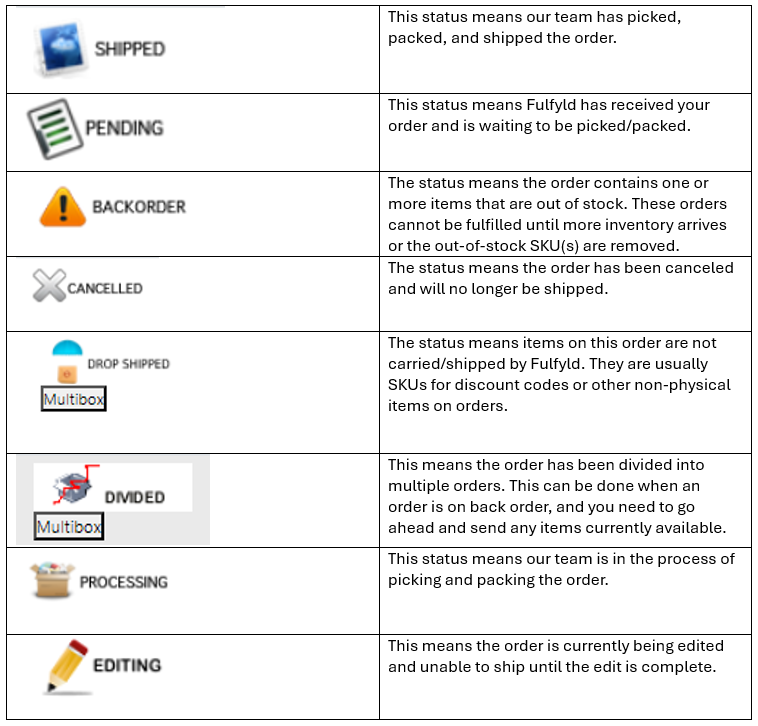
Order Submitted
Fulfyld has accepted your order and it’s been formally entered into our fulfillment workflow. This status confirms the order data is complete and correct. You’ll see this status within 1–2 hours of order placement.
Pending Fulfillment
Your order has been submitted and is waiting to be picked and packed by our fulfillment team. This is a holding status that typically lasts 24–48 business hours, depending on order volume and inventory availability. No physical work has begun on the order yet.
Order In Progress
Fulfyld staff are actively picking items from inventory and packing your order. This status means the order is on the warehouse floor and being assembled. Expect this phase to last 4–24 hours depending on order complexity and current workload.
Sent to Fulfillment
Your order has been fully packed and prepared for shipment, and the package is being routed to the carrier or shipping staging area. This status typically lasts a few hours. The order is nearly ready to leave our facility.
Released (Order Status Released)
Fulfyld has officially released the order to the shipping carrier and it is no longer in our physical possession. This status confirms the handoff to logistics is complete. This transition happens within 1–4 business hours of packing.
Released to Store
Your order has been released and is available for pickup or collection at a designated retail location or store. This status applies to orders fulfilling through store-pickup channels rather than carrier shipment. The order is ready for customer collection immediately.
Item Not Fulfilled
One or more items in your order could not be picked or packed due to inventory shortage, damage, or other fulfillment issues. This status indicates a partial fulfillment or exception. You may receive communication about a refund or substitute depending on your agreement with Fulfyld.
Awaiting Shipment
Your order has been packed and is staged for pickup by the carrier, but the carrier has not yet collected it. This is a brief transitional status that typically lasts 1–8 hours. The order is in our shipping dock or transfer area.
Shipment Pending
Your order is packed and labeled, and the carrier is scheduled to pick it up imminently. This status means the shipment is queued and ready but not yet in carrier hands. Expect this to resolve within 24 hours.
Included in Shipment
Your order has been consolidated into a larger shipment being sent to the carrier for transit. Multiple orders may be grouped in a single shipment container for efficiency. The order will receive a tracking number once the carrier scans the package.
Fulfilled / Order Fulfilled
Your order has been completely picked, packed, and handed off to the shipping carrier (or collected from a store location). This is the confirmation that Fulfyld’s responsibility for fulfillment is complete. The order is now in transit or has been collected by the customer.
On Its Way
The carrier has accepted your order and it is actively moving through the logistics network toward its destination. This status means the order has been tendered to the carrier and a tracking number is available. Transit time varies by carrier and destination, typically 2–7 business days.
Delivered
The carrier has successfully delivered your order to the final address. This is the end-state status for a successful fulfillment. Delivered orders are complete and no further action is required unless a customer initiates a return.
Open Order
Your order has been created but not yet fully processed or submitted to Fulfyld for fulfillment. This status appears for orders that are still being edited or awaiting confirmation in your system. An open order may remain in this state indefinitely until you formally submit it.
On Hold
Fulfyld has temporarily paused processing of your order due to payment issues, address verification problems, inventory constraints, or customer request. The order will not progress until the hold is manually released by you or Fulfyld support. Holds can last from hours to days depending on the reason.
Cancelled
Your order has been intentionally stopped and will not be fulfilled. Cancellation can occur at your request or due to exceptions that make fulfillment impossible. Cancelled orders cannot be restarted; you must create a new order if you wish to proceed.
Returned / Return In Progress
The customer has initiated a return or the order is being processed for return to your location. This status indicates the package is in transit back to you or awaiting receipt at our return receiving area. Return processing typically takes 5–10 business days from initial carrier pickup.
Common status transitions
- Standard fulfillment flow: Order Received → Order Submitted → Pending Fulfillment → Order In Progress → Sent to Fulfillment → Released → Awaiting Shipment → On Its Way → Delivered
- Store pickup flow: Order Received → Order Submitted → Pending Fulfillment → Order In Progress → Released to Store (ready for pickup immediately)
- Orders with holds: Order Received → On Hold → (hold released) → Order Submitted → Pending Fulfillment → (continues normally)
- Cancelled or partial orders: Order Received → Order Submitted → Pending Fulfillment → Item Not Fulfilled or Cancelled (order stops progressing)
When a status seems stuck
Order has been “Pending Fulfillment” for more than 48 hours. Check your inventory levels in Fulfyld—an out-of-stock item will delay the entire order. If inventory is available, the order may be queued behind high-volume days. Contact Fulfyld support with your order number for a status update.
Order shows “On Hold” with no explanation. This typically indicates a payment decline, address issue, or system flag. Review your order details and payment method in your Fulfyld dashboard. If you cannot resolve it, reach out to support to identify and clear the hold.
Order is stuck on “Awaiting Shipment” or “Shipment Pending” for over 24 hours. The carrier may not have picked up the shipment yet, especially during peak seasons or weekends. Orders placed on Friday may not ship until Monday. Allow an additional business day before contacting support.
Order shows “Item Not Fulfilled” but you weren’t notified. An inventory shortage or damaged item triggered a partial fulfillment exception. Check your email for communication from Fulfyld about refunds or options. If you haven’t received notification within 2 business hours of seeing this status, contact support immediately.
Need more help?
If a status remains unclear or your order’s progression seems unusual, reach out to the Fulfyld support team with your order number and current status for immediate assistance.