Brett McCleary is Director of Implementation at Fulfyld, where he leads client onboarding and the integrations that connect brands' stores, marketplaces, and systems to Fulfyld's fulfillment operation.
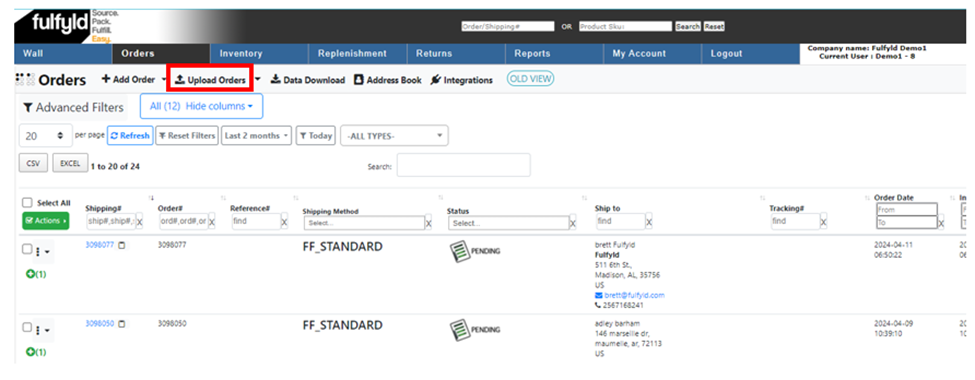
Click the Browse button to upload the order CSV file you wish to upload.
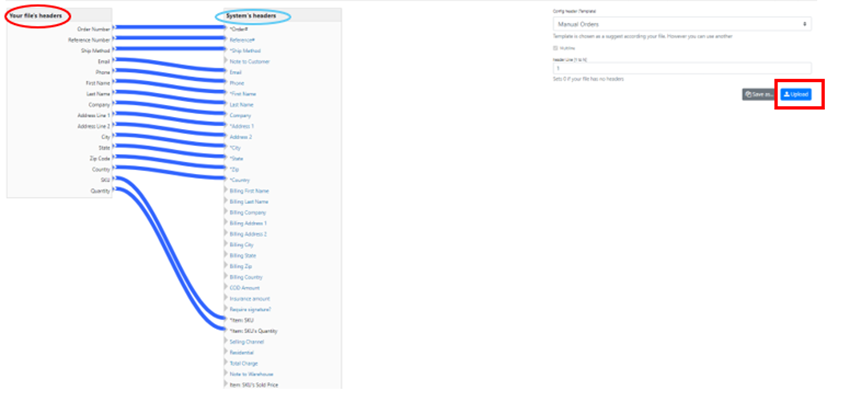
Map Order Fields from Your CSV File: Ensure all the File header fields circled in Red match the system headers circled in Blue, as shown below. Click upload to add the file.
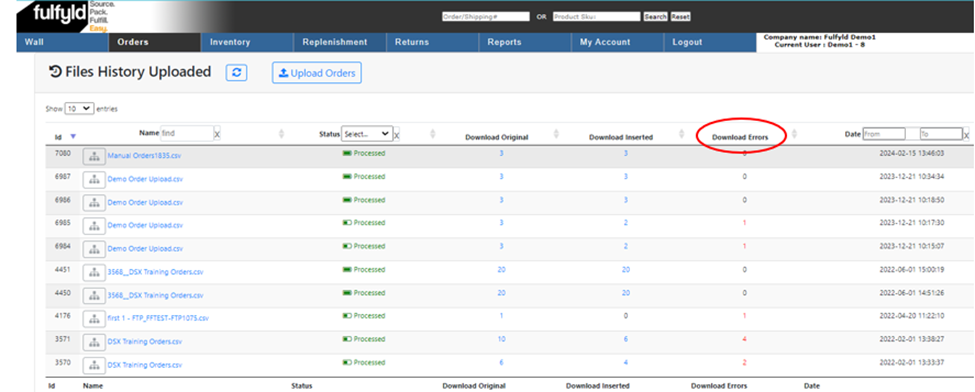
Make sure there are no download errors in the column circled below. If no errors are present, then you successfully completed the upload. If there is an error proceed to the next step.
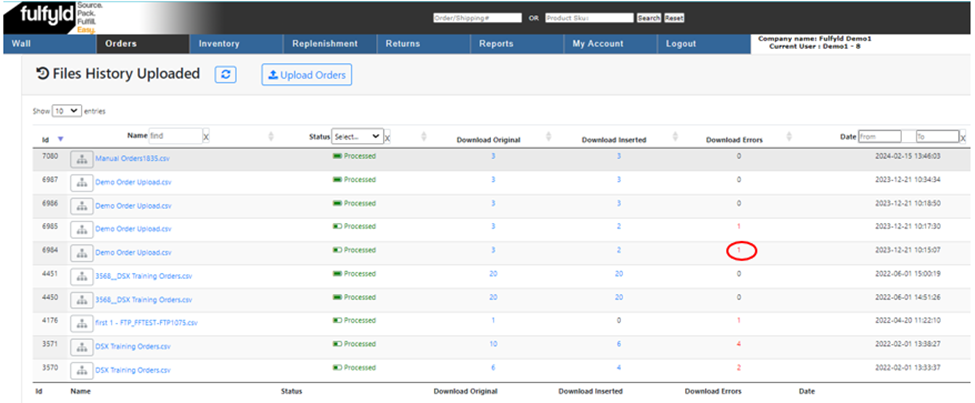
If there is an error, click on the red number in the Download Errors column. This will download a CSV file that will tell you what caused the error.
Open the error file to see what caused the error. Update the original CSV file to fix the error. Once the file is updated, start the upload process.
Example CSV File: Download Here
Frequently Asked Questions
How do I start uploading orders in bulk via CSV?
Click on the Upload Orders button to begin the bulk upload process.
What should I do to ensure my CSV file is correctly formatted?
Map the order fields by ensuring all File header fields circled in Red match the system headers circled in Blue before uploading.
How do I know if my bulk order upload was successful?
Check the column indicated in the instructions for download errors. If no errors are present, your upload was completed successfully.
What should I do if I encounter errors during the bulk upload?
If errors appear in the error column, proceed to the next troubleshooting step to resolve the issues before attempting to upload again.
Brett McCleary is Director of Implementation at Fulfyld, where he leads client onboarding and the integrations that connect brands' stores, marketplaces, and systems to Fulfyld's fulfillment operation.
To provide the best experiences, we use technologies like cookies to store and/or access device information. Consenting to these technologies will allow us to process data such as browsing behavior or unique IDs on this site. Not consenting or withdrawing consent, may adversely affect certain features and functions.
Functional
Always active
The technical storage or access is strictly necessary for the legitimate purpose of enabling the use of a specific service explicitly requested by the subscriber or user, or for the sole purpose of carrying out the transmission of a communication over an electronic communications network.
Preferences
The technical storage or access is necessary for the legitimate purpose of storing preferences that are not requested by the subscriber or user.
Statistics
The technical storage or access that is used exclusively for statistical purposes.The technical storage or access that is used exclusively for anonymous statistical purposes. Without a subpoena, voluntary compliance on the part of your Internet Service Provider, or additional records from a third party, information stored or retrieved for this purpose alone cannot usually be used to identify you.
Marketing
The technical storage or access is required to create user profiles to send advertising, or to track the user on a website or across several websites for similar marketing purposes.
To provide the best experiences, we use technologies like cookies to store and/or access device information. Consenting to these technologies will allow us to process data such as browsing behavior or unique IDs on this site. Not consenting or withdrawing consent, may adversely affect certain features and functions.
Functional
Always active
The technical storage or access is strictly necessary for the legitimate purpose of enabling the use of a specific service explicitly requested by the subscriber or user, or for the sole purpose of carrying out the transmission of a communication over an electronic communications network.
Preferences
The technical storage or access is necessary for the legitimate purpose of storing preferences that are not requested by the subscriber or user.
Statistics
The technical storage or access that is used exclusively for statistical purposes.The technical storage or access that is used exclusively for anonymous statistical purposes. Without a subpoena, voluntary compliance on the part of your Internet Service Provider, or additional records from a third party, information stored or retrieved for this purpose alone cannot usually be used to identify you.
Marketing
The technical storage or access is required to create user profiles to send advertising, or to track the user on a website or across several websites for similar marketing purposes.