

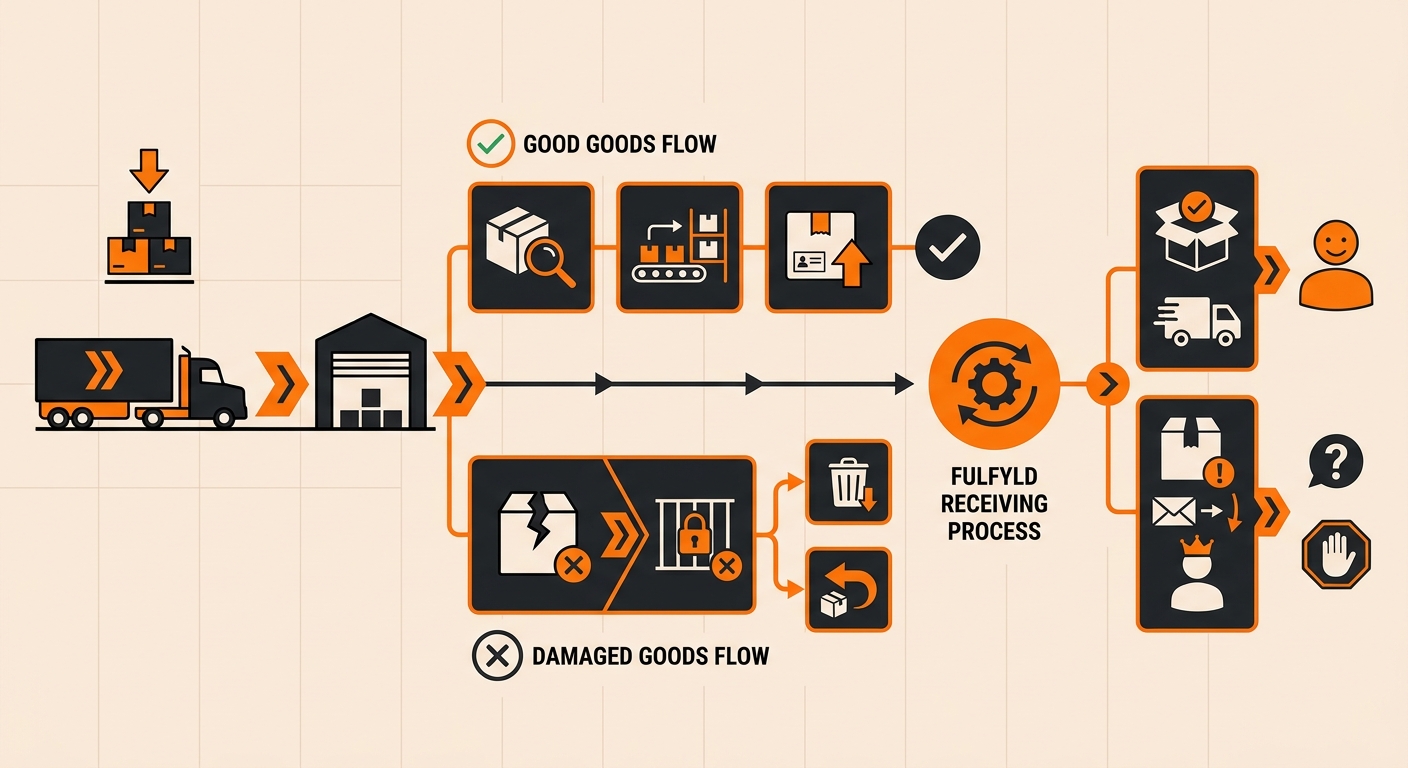
What Counts as Damaged Goods at Receiving

Visible damage is anything the receiving team can spot during unloading: crushed cartons, dented cans, torn shrink wrap, broken seals, or shattered glass. This gets flagged immediately, before the shipment is checked into inventory.
Concealed damage is different. The outer packaging looks fine, but the product inside isn’t. This usually surfaces later, during putaway or when a unit is picked for an order.
Both types follow the same reporting process once they’re identified, just at different points in the receiving timeline.
Either way, the goal is the same: catch it before it’s mixed in with sellable stock and before it ships to a customer.
How Fulfyld Handles Damaged Goods on Receive
Step 1: Inspection at the Dock

Every inbound shipment is checked against the packing slip or BOL as it’s unloaded. If a carton shows visible signs of damage, the receiving team sets it aside instead of moving it into general stock. Shipments with heavy or widespread damage are also noted on the delivery receipt at the time of drop-off, which matters if a carrier claim ends up being necessary.
Step 2: Documentation and Photos
Before anything else happens, the damaged units are photographed and counted. This covers the exterior packaging, the product itself, and the relevant SKU or lot information where applicable. These photos become the record used later for any credit, replacement, or claim decision, so this step isn”t skipped or rushed.
Step 3: Quarantine and Hold

Damaged inventory is physically separated from sellable stock and placed in a quarantine bin. It’s marked on hold in Shipedge so it can’t be picked for an order by mistake while a decision is pending. This keeps a damaged unit from accidentally shipping to a customer before you’ve had a chance to weigh in.
Step 4: Notification to Your Account Manager
Once the units are documented and held, your account manager reaches out with the photos, the affected quantity, and the SKU details. This is also the point where carrier-related damage gets flagged, since freight claims usually need to be filed within a specific window after delivery.
What Happens to Damaged Inventory After It’s Reported
Once you’ve reviewed the documentation, there are generally three paths forward.
File a carrier claim: if the damage happened in transit rather than at the manufacturer, it’s noted on the receiving paperwork so you have what’s needed to file a freight claim. Fulfyld can supply the photos, counts, and timestamps, but the claim itself is typically filed by you or your freight broker, since the shipping contract sits between you and the carrier.
Return to vendor: if the damage points to a manufacturing or packaging issue on the supplier’s end, the units can stay on hold until you’ve arranged a return and exchanges with them.
Dispose of the inventory: for damage that makes the product unsellable and not worth returning, you can instruct Fulfyld to dispose of the units. This gets logged so your records reflect the loss accurately rather than leaving it as an unexplained gap.
Whatever you decide, the damaged quantity is adjusted out of your sellable inventory count so it doesn’t show up as available stock on your dashboard or sync incorrectly to your sales channels.
Still Have Questions?
For questions about packing instructions for a specific SKU, contact your dedicated account manager directly, or reach the Fulfyld team at hey@fulfyld.com or (256) 716-8241.