

A packing slip looks like a small piece of paper, but it shapes how a customer feels about your brand before they open the box. Get it right, and you build trust and repeat business. This guide covers every real option: Shopify’s own template, downloadable designs, and apps that automate it all.
The Fastest Way to Get Shopify Packing Slip Templates
You have three practical routes to a packing slip template for your Shopify store, and which one fits depends on how much control you want. For merchants already using Shopify fulfillment services, packing slips play a direct role in keeping order accuracy tight:
- Shopify’s native template. Built into every store at no cost. It’s plain, but it’s functional and ready in minutes.
- A free downloadable template. Design sites like Template.net or TemplateArchive offer more visual polish, though you’ll need to edit them manually.
- A dedicated app. Tools such as Order Printer Templates or SuperPack hand you drag-and-drop customization and automation on top of the base template.
What Belongs on Every Packing Slip Template
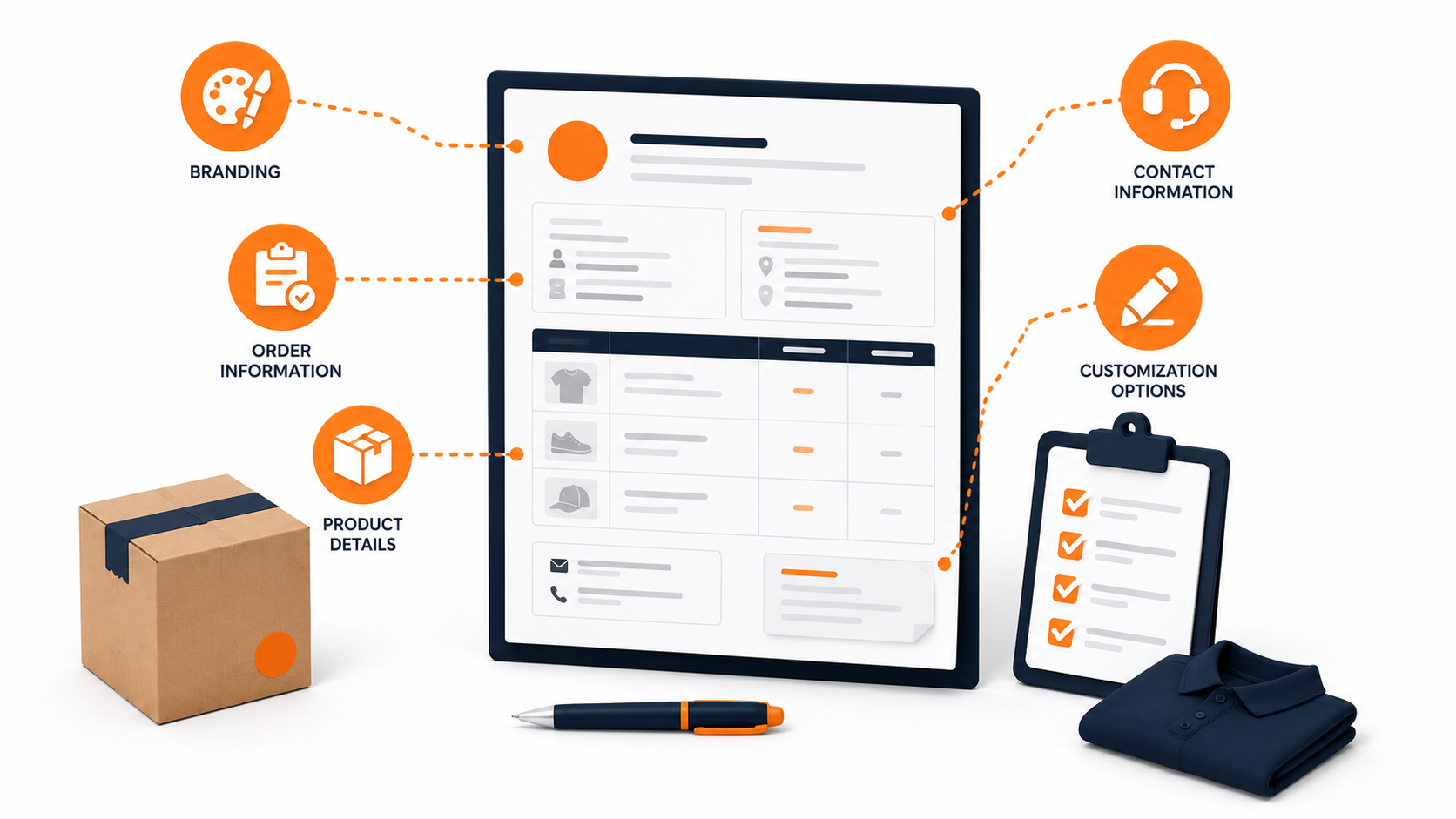
Whichever route you pick, a strong packing slip needs to cover the same ground. Here’s what to check for before you commit to a design, per this packing slip checklist:
- Branding, Your logo, brand colors, and typography should appear somewhere on the page. It’s a small detail that makes the document look like it belongs to your business instead of a template site.
- Order information, Order number, customer name, and shipping address need to be front and center so anyone glancing at the slip can confirm the shipment in seconds.
- Product details, List every item, quantity, size, and variant clearly. Vague descriptions cause returns and support tickets.
- Contact information, A support email or phone number gives the customer a direct way to reach you if something’s wrong with the order.
- Customization options, Pick a format you can actually edit, whether that’s a spreadsheet, a Word file, or an app’s built-in editor. A template you can’t modify isn’t worth much.
Get these five elements right, and the rest of your packing slip design is just polish.
Packing Slip vs. Invoice vs. Shipping Label
Merchants mix these three documents up often enough that it’s worth being precise. A packing slip lists the physical items in the box, usually without pricing; it’s a fulfillment document built for the warehouse, not for accounting.
Packing slips give you a written record of what shipped, which is a different job entirely from an invoice or a shipping label.
- An invoice is the financial record showing prices, taxes, and payment terms, which is why B2B orders typically need one attached alongside the shipment.
- A shipping label goes on the outside of the box and only tells the carrier where to deliver it; it carries no information about what’s inside.
If you need one, Fulfyld has a free shipping label template you can grab separately.
Keep these three separate, particularly if you sell gifts. Showing a price on a slip meant for someone who didn’t pay for the item undermines the gesture. Many merchants drop pricing from the packing slip entirely for gift orders while keeping it on the invoice.
Navigating Shopify’s Built-In Packing Slip Template
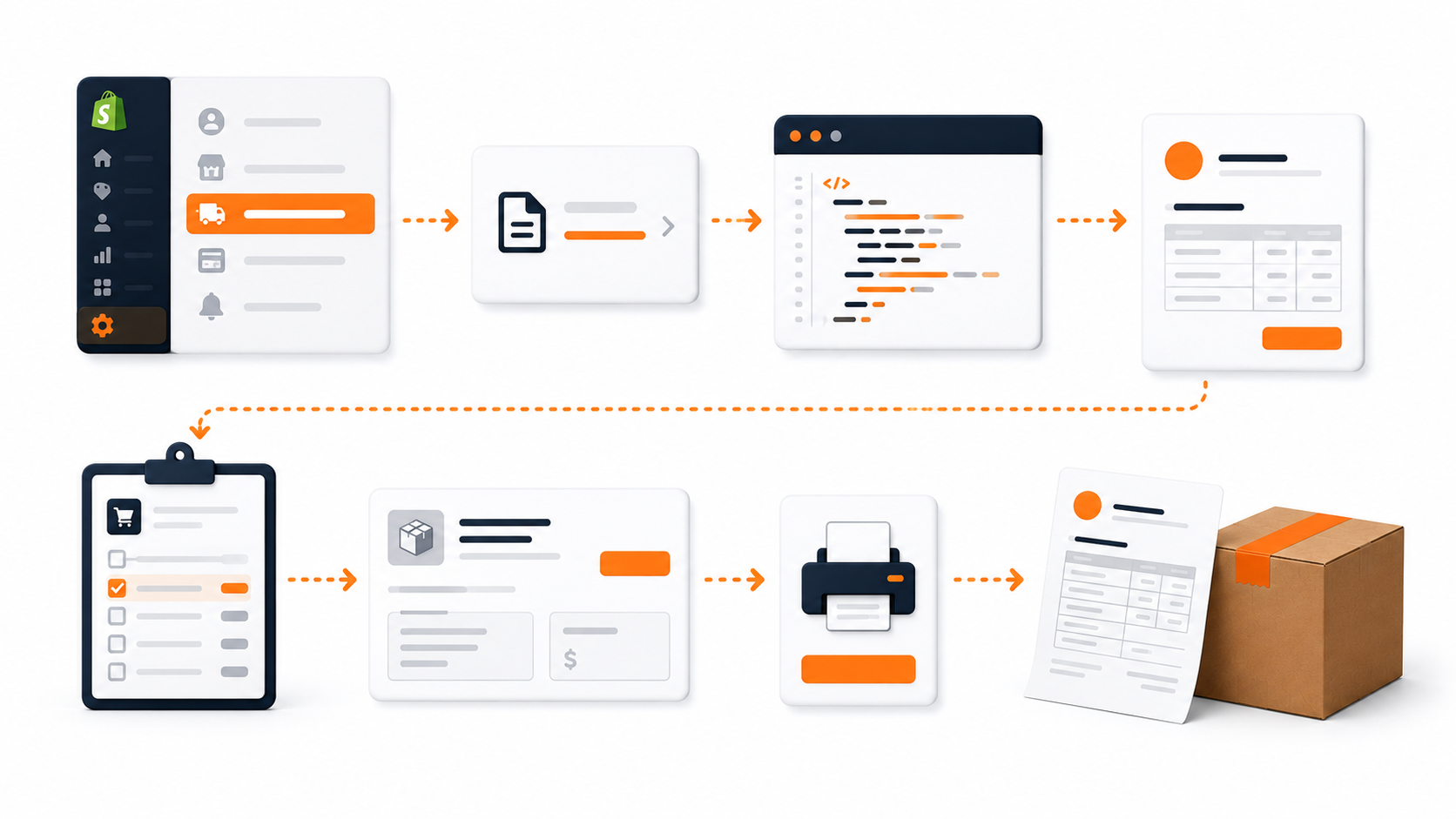
Shopify ships with a default packing slip template for every store, and it’s the quickest option if you’re not ready to shop around. It won’t win design awards, but it’s accurate, free, and already wired into your order data.
Editing the template and actually printing a slip for a live order are two separate tasks, so here’s how each one works.
How to Edit the Default Template
Customizing the look of your packing slip takes a few clicks:
- From your Shopify admin, go to Settings, then click Shipping and delivery.
- In the Documents section, click Packing slip template.
- Edit the HTML, CSS, and Liquid code to add your logo, adjust colors, or change what fields display. Shopify’s built-in editor works fine for this, though you might also want to compare it against our Shopify order fulfillment services, which handle the packaging and slip printing for you.
- Click Preview template to check your changes, then click Save.
Customizing this template costs nothing beyond the time it takes, and it lets you add a personal touch to your packaging materials so the slip feels like a cohesive part of the brand experience rather than an afterthought.
How to Print a Packing Slip for an Order
Once your template is set, generating slips for actual shipments is a separate step:
- From your Shopify admin, go to Orders.
- Click the order you want to print a slip for, or select multiple orders if you’re batching.
- Click Print, then Print packing slips. The Shopify mobile app supports the same action from an order’s detail view.
- If your store has multiple locations, choose the correct one before printing.
Batch printing matters once volume grows; selecting several orders at once and printing packing slips together saves real time compared to opening each order individually.
Free Online Resources for Packing Slip Templates
If Shopify’s built-in option feels too plain, several sites offer free, downloadable packing slip templates with more visual variety. These work well if you want a polished look without paying for an app subscription.
| Resource | Best For | Format Options |
|---|---|---|
| Template.net | A wide variety of styles, from minimalist to detailed | Word, Excel, PDF |
| InvoiceBerry | Simple, single-format download | Excel (.xlsx) only |
| TemplateArchive | Large free library with several design variations | Word, Excel |
| 101Planners | Fillable options if you don’t want to install software | Word, Excel, typeable PDF, Google Docs/Sheets |
What to Check Before Downloading a Template
Not every free template is worth your time. Run through this short checklist first:
- Design fit, Does the layout match your brand’s visual style, or will you spend an hour reformatting it?
- File format, Confirm the download opens in software you already have, so you’re not converting files just to make a basic edit.
- Printer compatibility, Test a sample print before committing. Some downloaded layouts shift or clip when printed on standard letter-size paper.
Once you’ve settled on a design, the next question is whether you want to manage it manually or hand the job to an app.
Automating Packing Slips with Shopify Apps
Manually editing a downloaded template works fine at low order volume. Once you’re shipping dozens of orders a day, an app that auto-generates packing slips from your Shopify data saves real time.
Multi-Platform Shipping Apps to Consider
- ShipStation, One of the more established options here. It connects to Shopify and several other platforms, generates packing slips automatically, and prints shipping labels in the same workflow, which keeps you from juggling two separate tools.
- OrderlyPrint, Focuses specifically on packing slip customization. You can add your logo, choose from several layout options, insert return policy language, and batch-print slips for large order runs instead of generating them one at a time.
- ShipWorks, Goes further into full fulfillment territory, with batch printing, automated order imports, and real-time tracking updates layered on top of its packing slip generator. It suits merchants managing higher order volumes across multiple sales channels.
- EasyShip, An all-in-one shipping platform. Beyond packing slips, it offers discounted shipping rates, barcode support for tracking, and integrations across several e-commerce platforms.
Shopify-Specific Apps Worth Comparing
A few apps built specifically for Shopify’s app store are also worth a look if you want tighter native integration and additional features and customization options:
| App | Standout Feature |
|---|---|
| Bold Packing Slip | Personalized messages and custom branding built into every slip |
| SuperPack | Barcode support, custom fields, and automated thank-you notes |
| Order Printer Templates | Drag-and-drop editor for building templates from scratch |
Why Bother With an App at All
Beyond convenience, apps built for Shopify stores tend to offer three practical advantages over a static downloaded template:
- Stronger branding control, Deeper customization means your packing slip stays consistent with your site and packaging across every order.
- Automation, Slips generate themselves from order data, cutting out manual formatting for each shipment.
- Personalization at scale, Dynamic fields let you insert customer-specific messages or offers without editing each slip by hand.
Special Cases: Multi-Box and International Shipments
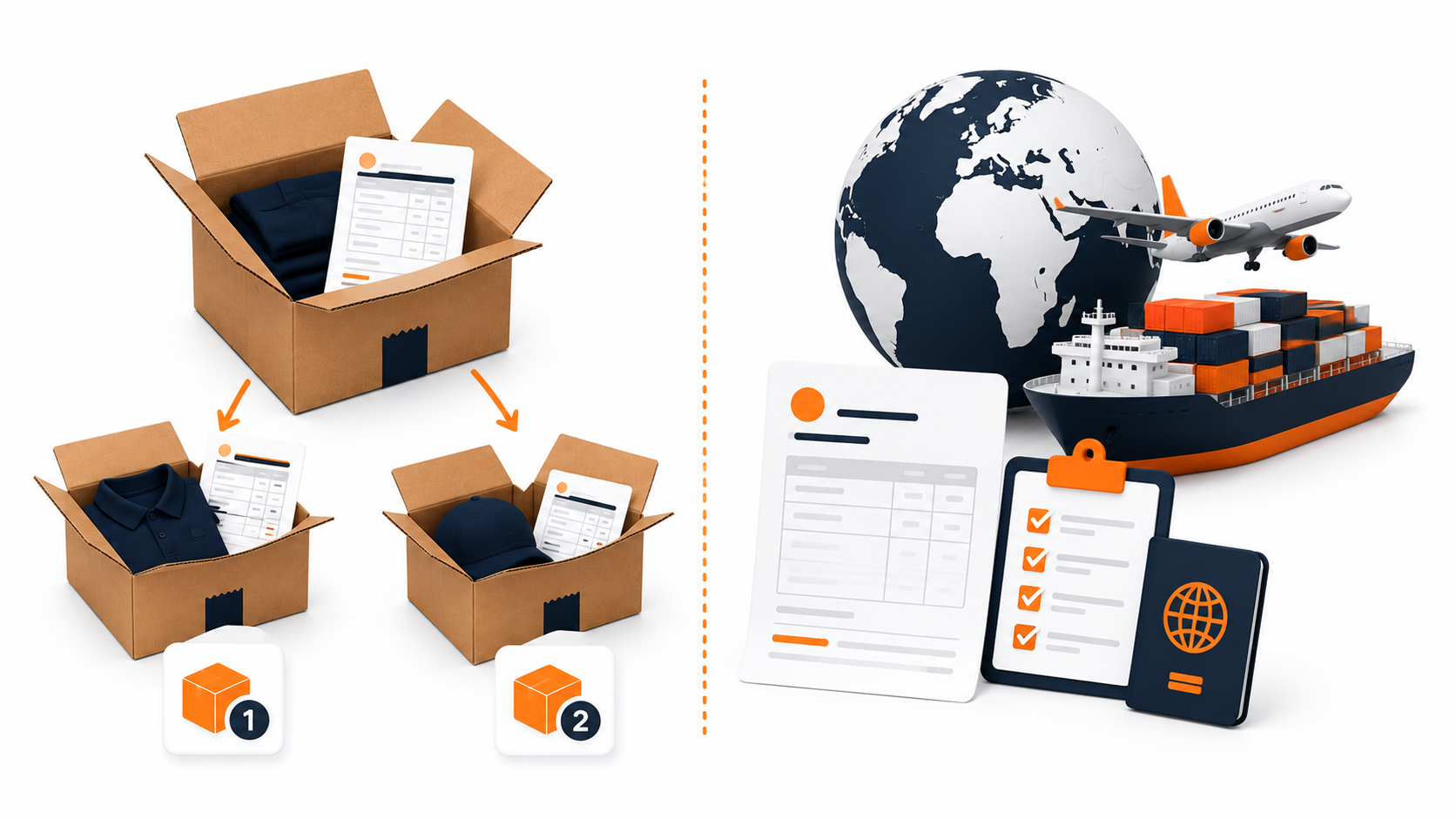
Most guides stop at design and software. But two special situations trip merchants up more than any template choice: orders that ship in more than one box, and orders that cross a border.
When One Order Ships in Multiple Boxes
If an order splits across two or more boxes, each box needs its own packing slip listing only what’s inside that specific package. A note such as “Package 1 of 2” keeps the customer from wondering where the rest of the order is.
Shopify handles this automatically, since packing slips are generated per fulfillment, not per order. If you fulfill a shipment in two batches, each batch gets its own slip.
Apps like Order Printer Pro take this further, letting you filter by fulfillment so a partial shipment’s slip never lists items that haven’t shipped yet.
Packing Slips for International Orders
Cross-border shipments usually need more paperwork than a packing slip alone. A commercial invoice declaring the value and origin of goods is required for customs clearance, and freight moving by sea or land may also need a bill of lading.
Whatever you print, make sure the quantities match across every document; a mismatch between the packing slip and the customs paperwork is one of the more common reasons a package gets held up at the border.
Rolling Out Your New Packing Slip Template
Picking a template is the easy part. Rolling it out across your live order flow is where mistakes tend to creep in, so treat this step with the same care you’d give a website launch.
Best Practices Worth Following
A few simple habits keep your packing slips looking sharp order after order:
- Stay consistent. Use the same template across every shipment. A packing slip that looks different from order to order reads as sloppy, even if each individual version looks fine.
- Double-check accuracy. Product names, quantities, and customer details need to match the order exactly. An error here isn’t just embarrassing; it can trigger a support ticket or a return.
- Review periodically. Pull a handful of printed slips every few months and compare them against your current brand guidelines. Logos and taglines change; your template should keep up.
Mistakes to Avoid
These are the most common slip-ups merchants run into after launch:
- Cramming too much on the page. A packing slip isn’t a brochure. Stick to what the customer and your warehouse team actually need.
- Leaving out key details. Missing a size, color, or SKU on the slip creates confusion during returns and makes customer support’s job harder.
- Skipping the test run. Print a sample before it goes live. Broken layouts, cut-off text, and misaligned logos are far easier to catch on a test sheet than after a thousand orders have already shipped.
Download Shopify Packing Slip
Wrapping Up Your Packing Slip Strategy
Whether you stick with Shopify’s default template, grab a free download, or automate through an app, the real test is consistency: every order, every box, every time. Test a print before going live, and revisit the design whenever your branding changes.
A polished packing slip pairs your paperwork with your product. But if fulfillment itself, not the design, is the bottleneck, Fulfyld can help.
Get Custom Pricing, and a dedicated 3PL team will pick, pack, and print your branded packing slip on every order.
Templates track the work. We do the work.
This file will carry you a long way. But past a few hundred orders a month, tracking fulfillment in a spreadsheet becomes the bottleneck. That is the point of a 3PL: Fulfyld picks, packs, and ships every order under a formal SLA with automatic credits, one flat all-inclusive per-order price, and a dedicated account manager who knows your catalog.
Get a real quote