

A confusing order form costs you more than a few typos; it costs wrong shipments, wasted product, and customers who don’t reorder. Get the layout right in Word, and a simple document becomes an error-proof, professional tool your customers actually trust.
Here’s exactly what to include and how to make it work harder for your business.
What to Include in a Supplement Order Form
If you’re building an order form for supplements, there are three sections it has to cover, no exceptions: who’s ordering, what they’re ordering, and how they’re paying and receiving it. Get these right and everything else is polish.
The table below breaks down what belongs in each section and why it matters.
| Section | What to Include | Why It Matters |
| Customer Details | Name, phone, email, shipping address | Prevents delays caused by incomplete or mistyped contact info |
| Product Selection | Product names, dosage/size, quantity, unit price | Reduces mis-picks and gives customers a clear view of what they’re buying |
| Payment & Shipping | Payment method, shipping speed, delivery notes | Sets expectations upfront and cuts down on “where’s my order” emails |
Selling more than one type of product? Fulfyld’s full library of order form templates covers formats beyond supplements, too. And if you want to see how your order and shipping speed stack up against other brands in your space, Fulfyld’s supplement fulfillment benchmarks are worth a look.
Choosing Between a Printable and Digital Format
Not every supplement business needs a fully digital form. The right format depends on where and how you actually take orders:
- Print-ready layouts work best for kiosks, trade show booths, or wholesale counters; keep font sizes legible and leave enough white space for handwriting.
- A simple, printable order form suits smaller brands taking orders by phone, at pop-up events, or through wholesale reps who prefer paper.
- One master Word file, exported to PDF whenever a print copy is needed, keeps you from juggling two layouts with two sets of fields.
Once you know what goes into the form, the next step is deciding how it should look and behave.
Designing a Clean, Easy-to-Use Layout
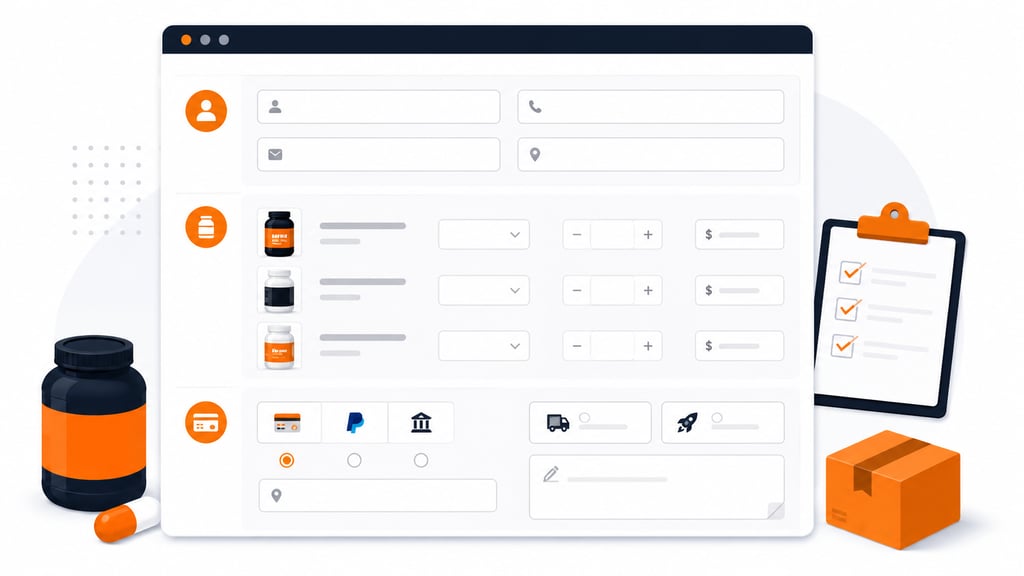
A well-organized layout isn’t just about looks; it directly affects order accuracy. Cluttered forms lead to skipped fields and mistyped quantities, so when you’re building this out, prioritize a clean, logical structure over anything flashy.
Word’s built-in template library gives you a solid starting point that you can customize freely, and it’s a lot faster than starting from a blank page.
Customer Details
Start by capturing the basics: name, contact info, and shipping address. Word’s form fields let you build interactive elements that auto-populate returning customer data, which saves time on both ends and cuts down on typos.
Product Selection and Quantity
List your supplement options with clear descriptions and pricing attached. Drop-down menus or checkboxes make selection faster and keep customers from typing product names incorrectly, something that causes more picking errors than people expect.
If you carry multiple sizes or flavors of the same product, list them as separate line items rather than relying on a customer to remember to specify; that one habit alone prevents a surprising number of fulfillment mistakes.
Payment and Shipping Options
Offer more than one payment method, credit card, PayPal, and similar options, to give customers flexibility instead of forcing them into a single checkout path. Add fields for shipping preferences, delivery notes, and expedited options if you offer them.
Keep this section near the bottom of the form, right before the summary, so customers finalize logistics after they’ve already committed to their product selection.
Building in Validation and Automatic Calculations
Interactive features that catch errors before submission make a real difference in how smoothly orders come in. Word lets you set validation rules that flag missing or incorrect fields, so customers fix problems themselves instead of you catching them after the fact.
Formulas Worth Setting Up
A few small automations go a long way toward keeping every order accurate and clean:
- Automatic totals, discounts, and tax calculations remove manual math errors entirely.
- A summary section at the end lets customers double-check everything before they finalize the order.
- Locked pricing fields stop accidental edits, so customers can fill in quantities without the risk of overwriting a formula.
That one small addition cuts down on “I ordered the wrong thing” messages more than most people expect.
Testing and Refining Your Template Over Time

Don’t skip testing. Run the form past a handful of real users, or a small beta group, before rolling it out fully. Small friction points you don’t notice yourself are exactly what testers will catch.
What to Watch For During Testing
Look for patterns, not just isolated mistakes:
- Skipped fields that several testers miss in the same spot
- Confusing labels that lead to the wrong information being entered
- Cramped sections where fields feel too narrow to use comfortably
If multiple testers trip over the same spot, that’s a design problem, not a user problem, and it’s worth fixing before the form goes live.
Treat the template as a living document. Update it as feedback comes in and your product line changes; a form that worked fine a year ago might not fit your current SKU count or shipping options, so build a habit of reviewing it every quarter or so.
Refinements Worth the Extra Five Minutes
A few small adjustments go a long way toward making your form feel professional and easy to use:
- Add your branding. A logo or brand colors reinforce identity and make the form instantly recognizable as yours.
- Write clear instructions. A short line above a confusing field prevents more errors than you’d think.
- Number every form. Give each order a unique number so you can trace it back to a shipment or payment record if a question comes up later.
- Add a short returns note. A one-line pointer to your returns and exchanges process answers a common question before a customer has to ask it.
Download Free Template For Your Supplement Brand
Turn Order Accuracy Into Supplement Business Growth
You don’t need custom software to pull this off, just the right fields, working validation, and a habit of testing before you launch. Get those three right, and the form starts working for you instead of against you.
Scaling past manual order handling? See what running a supplement business looks like with dedicated fulfillment support behind it.
Let’s build a smoother ordering experience together.
Templates track the work. We do the work.
This file will carry you a long way. But past a few hundred orders a month, tracking fulfillment in a spreadsheet becomes the bottleneck. That is the point of a 3PL: Fulfyld picks, packs, and ships every order under a formal SLA with automatic credits, one flat all-inclusive per-order price, and a dedicated account manager who knows your catalog.
Get a real quote