

Most brands track product weight and stop there. But carriers bill on whichever number is higher: actual weight or volumetric weight, and a single oversized box can turn a cheap label into an expensive one.
You won’t see it coming until the invoice does. Run your dimensions through the calculator above before you finalize packaging, not after.
What Is Volumetric Weight, and Why Does It Cost More Than the Scale Says?
Volumetric weight, also called dimensional weight or DIM weight, is how carriers price the space a package occupies rather than what it weighs. A truck or aircraft has fixed room, so a large, light box takes up capacity that the carrier could otherwise sell. Every carrier converts a package’s dimensions into an equivalent weight using this formula:
Volumetric Weight (kg) = (Length × Width × Height in cm) ÷ Divisor
The divisor is set by the carrier and service level, and it’s the part most sellers get wrong. The carrier then compares volumetric weight against actual weight on the scale and charges whichever is higher, a figure usually called the chargeable weight or billable weight.
For dense, heavy goods, actual weight almost always wins. For bulky, lightweight goods like apparel or supplements, volumetric weight usually wins instead and can run several times higher than the true weight, which is why over-packaging is one of the costliest habits in parcel fulfillment.
How to Use the Calculator: Dimensions and Carrier Divisor
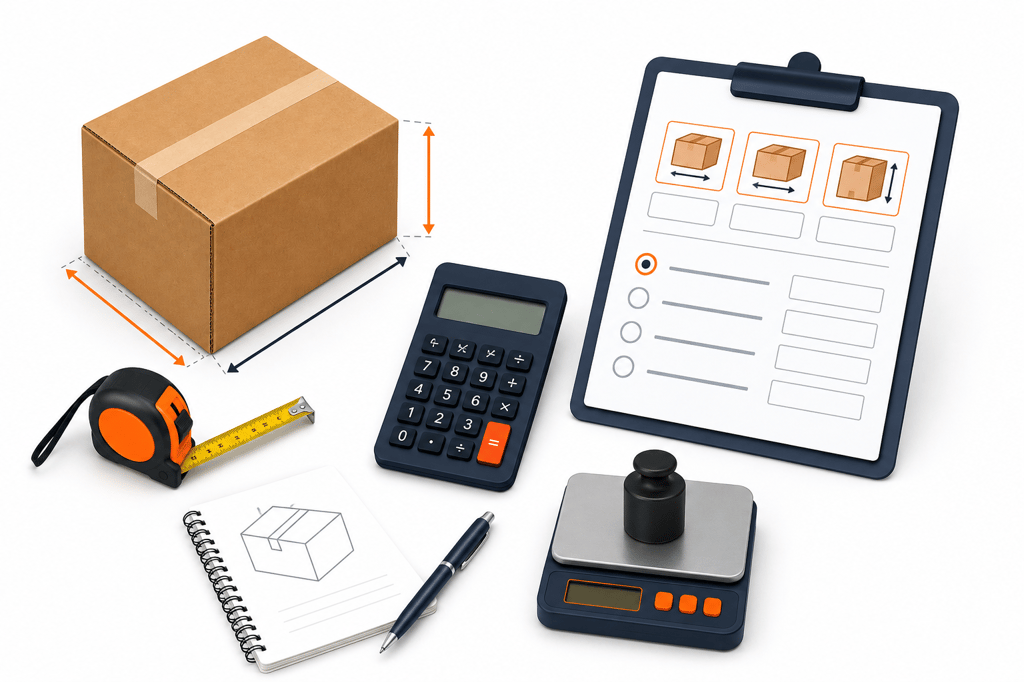
The calculator needs four inputs, and getting each one right is what makes the result useful.
Length, width, and height. Measure the outer packaging, not the product, since padding and void fill count toward your final dimensions. Trimming a few centimeters off any side can shift a shipment into a cheaper pricing tier.
A box size calculator can help you land on dimensions that fit without wasted space if you’re unsure what to reach for.
Carrier divisor. This is where most confusion comes from, since the same box can produce a different chargeable weight depending on who’s shipping it. The calculator gives you four options:
- 5000, the standard used by DHL, FedEx, and UPS for most express services
- 6000, common with air freight and some international economy services
- 4000, used by USPS and a number of regional couriers
- Custom divisor, for any carrier or contract rate not covered above
Select the option matching your shipping agreement and enter your dimensions. The calculator returns volumetric weight instantly, but it doesn’t ask for actual weight, so weigh the box separately, since the higher number is what gets billed.
Check your carrier’s rate card if unsure which divisor applies, since express and economy tiers sometimes differ. This matters even more for international fulfillment, where cross-border services often default to a different divisor than domestic ones.
Volumetric Weight Divisors by Carrier and Shipping Mode
The divisor changes the result significantly, so it helps to see how the major options compare before you calculate.
| Carrier or Mode | Typical Divisor | Formula |
| DHL Express | 5000 | (L × W × H cm) ÷ 5000 |
| FedEx (Express/International) | 5000 | (L × W × H cm) ÷ 5000 |
| UPS Worldwide | 5000 | (L × W × H cm) ÷ 5000 |
| Air freight (IATA standard) | 6000 | (L × W × H cm) ÷ 6000 |
| USPS and select couriers | 4000 | (L × W × H cm) ÷ 4000 |
| Road/economy freight | 3000 to 4000* | (L × W × H cm) ÷ 3000 or 4000 |
*3000 isn’t a preset, so select Custom divisor and enter it manually.
A lower divisor produces a higher volumetric weight for the same box, which is why economy and road services can end up costing more per package than express, despite being marketed as cheaper. This is the same logic behind a freight class calculator, since density drives price in freight the same way it does in parcel shipping.
An air-chargeable weight tool can confirm the exact billing weight for air shipments before you commit to a rate. Always confirm the divisor with your carrier rather than assuming it matches a competitor’s.
A Quick Example: How Packaging Changes the Bill
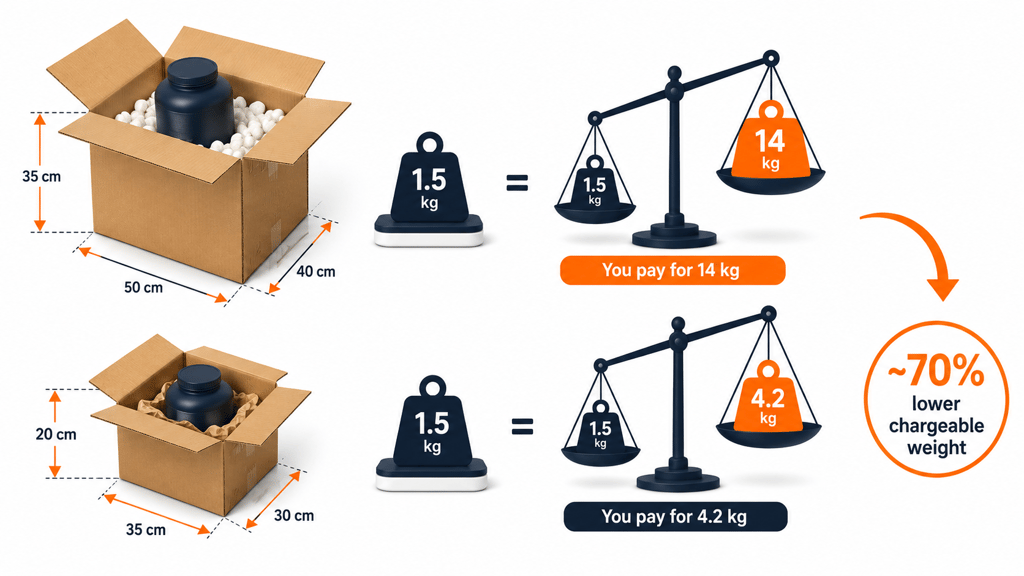
Say you’re shipping a product that weighs 1.5 kg, packed in a 50 × 40 × 35 cm box, using a standard 5000 divisor. The calculation looks like this:
(50 × 40 × 35) ÷ 5000 = 14 kg volumetric weight
Even though the item only weighs 1.5 kg, you’re billed for 14 kg because the box is what the carrier is pricing. Now resize that product into a tighter 35 × 30 × 20 cm box:
(35 × 30 × 20) ÷ 5000 = 4.2 kg volumetric weight
That single change drops the chargeable weight by roughly 70%, and multiplied across hundreds of monthly shipments, oversized packaging quietly becomes one of the more expensive habits in a fulfillment operation.
Pairing tighter boxes with eco-friendly packaging tends to compound the savings, since lighter void fill also lowers actual weight. For more, see this breakdown on where to reduce parcel dim weights.
Know What You’re Really Paying to Ship
This kind of tool isn’t just for math; it’s a decision-making asset. Knowing dimensional weight before you print a label means catching which SKUs are quietly losing margin to inefficient packaging, and deciding whether resizing a box is worth the effort instead of guessing after the invoice arrives.
If tightening up packaging across your catalog feels like more than your team has time for, Fulfyld can help. Our fulfillment team right-sizes packaging and cuts wasted space so dimensional weight stops eating into margins. Talk to a fulfillment expert to see where your packaging is costing you the most.