Quick answer: Fulfyld integrates directly with Walmart Marketplace. You can link your store with the click of a button, or your dedicated account manager can handle the connection on your behalf. Once live, orders placed on Walmart Marketplace are automatically sent to Fulfyld and shipped same-day for orders received before 1:00 PM Central Time.

How to Connect Walmart Marketplace to Fulfyld: Step by Step
Follow these steps to connect your Walmart Marketplace account and get orders flowing through Fulfyld.
Step 1: Get a Quote and Create Your Fulfyld Account
Start at fulfyld.com/get-fulfyld and fill out the intake form with your store details, estimated monthly order volume, and product type. A Fulfyld team member will respond with a flat-rate pricing proposal based on your specific setup.
Step 2: Connect with Your Dedicated Account Manager
Once you move forward, Fulfyld assigns you a dedicated account manager who will be your point of contact throughout onboarding and day-to-day operations.
Before any technical setup begins, use this conversation to walk through your Walmart product catalog, any custom packaging preferences, and shipping expectations, including whether you want to enable Fulfyld’s 2-day shipping option for Walmart customers. Getting these details aligned early avoids configuration issues down the line.
Step 3: Connect Your Walmart Marketplace Account
The Walmart Marketplace integration can be set up in one of two ways: you can link your store yourself through a simple authorization flow, or your account manager can handle the connection on your behalf.
Either way, the process involves granting Fulfyld access to your Walmart order and shipping data through Walmart’s API.
One important note specific to Walmart Marketplace: Walmart holds its third-party sellers to strict performance standards around shipping speed, on-time delivery rate, and order cancellation rate.
Step 4: Send Your Inventory to Fulfyld’s Warehouse
Once the connection is set up, ship your product inventory to Fulfyld’s warehouse at 511 6th St, Madison, AL 35756. Submit a replenishment in Shipedge (Fulfyld’s warehouse management system) before your inventory ships, including SKUs, quantities, and expected delivery dates.
Fulfyld covers the first 2 hours of receiving during onboarding at no cost.
Step 5: Map Your SKUs
Every product in your Walmart Marketplace store needs to be mapped to the corresponding item in Fulfyld’s system so that when an order comes in, the warehouse knows exactly what to pick.
Walmart uses its own item identifiers (including Walmart Item IDs and GTINs), so if those differ from your internal product codes, flag that with your account manager so the mapping accounts for both.
Step 6: Configure Your 2-Day Shipping Settings (Optional)
Fulfyld supports guaranteed 2-day delivery on Walmart Marketplace. If you want to offer this to your customers, your account manager will identify which customer addresses are eligible and configure the option so it displays at checkout for qualifying orders.
Step 7: Place a Test Order
Before going live, place a test order through your Walmart Marketplace store. This confirms the order is syncing to Fulfyld correctly, the SKU is mapping as expected, and tracking information is being passed back to your Walmart seller account accurately.
Catching any issues at this stage is far easier than resolving them once real customer orders are in motion.
Step 8: Go Live
Once the test order clears, the integration is active. From that point, Walmart Marketplace orders flow into Fulfyld automatically.
You can monitor order status and inventory levels through the Fulfyld client portal at any time, and your customers receive tracking updates through Walmart’s standard notification system.
What the Integration Handles Automatically
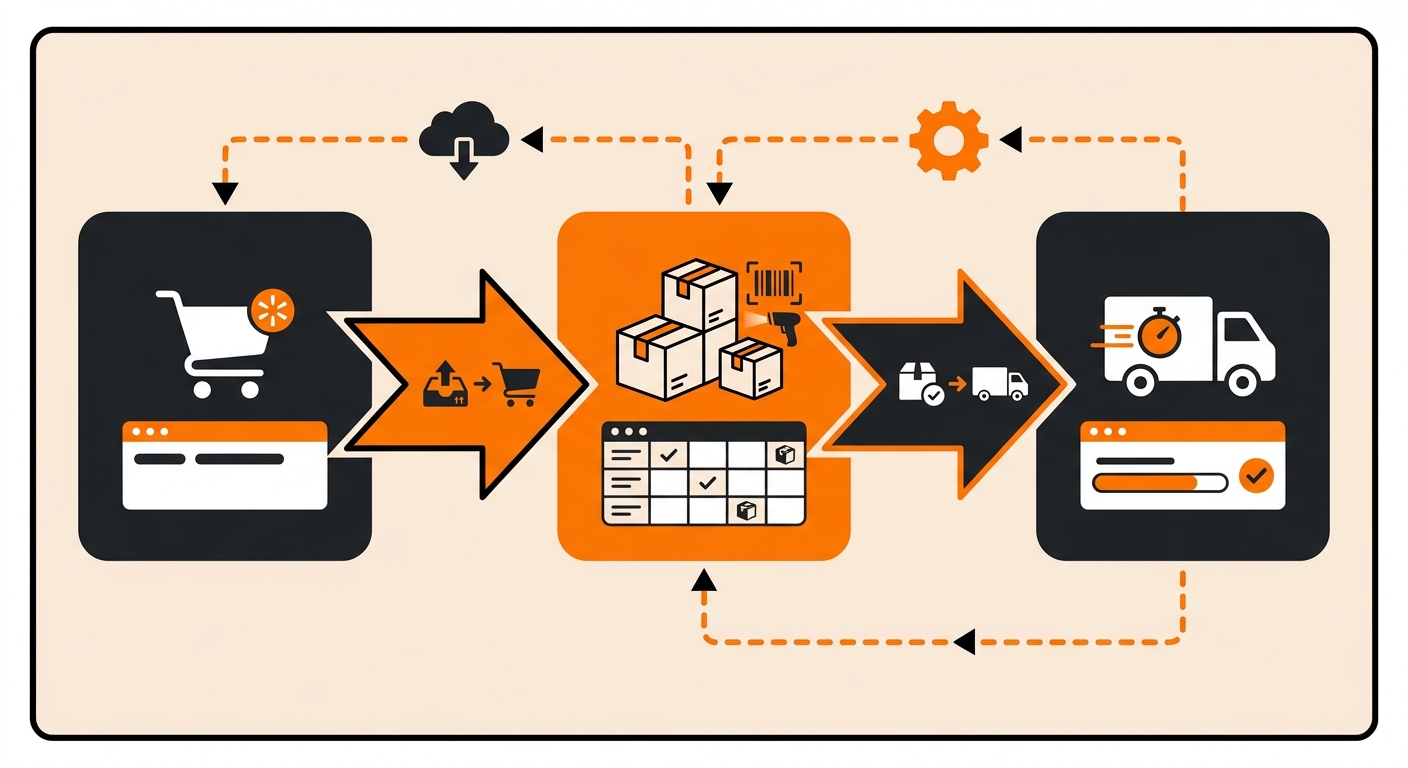
Once connected, the Walmart Marketplace–Fulfyld integration manages the following without any manual steps:
-
Order import from Walmart Marketplace to Fulfyld’s fulfillment system
-
Real-time inventory sync so your Walmart listings reflect accurate stock levels
-
Tracking number generation and automatic push back to your Walmart seller account
-
Returns processing through Fulfyld’s reverse logistics system, with inventory updates sent back when returned items are received at the warehouse
Get Help Connecting Walmart Marketplace to Fulfyld
If you’re ready to connect Walmart Marketplace to Fulfyld and want a dedicated account manager walking you through the API sync, inventory mapping, and 2-day guaranteed fulfillment setup, the fastest path forward is a direct conversation with the Fulfyld team.
To get started or for help with your Walmart Marketplace integration, reach out at hey@fulfyld.com or (256) 716-8241, or visit fulfyld.com/integrations/walmart-marketplace.
Frequently Asked Questions
Does Fulfyld support Walmart’s guaranteed 2-day delivery program?
Yes. Fulfyld can enable 2-day shipping on your Walmart Marketplace listings. During setup, your account manager identifies which customer addresses qualify for 2-day delivery based on Fulfyld’s carrier network and the warehouse location in Madison, AL.
Will connecting to Fulfyld affect my Walmart seller performance metrics?
It shouldn’t, and with proper setup, it should improve them. Fulfyld ships same-day for orders received before 1:00 PM Central Time and provides tracking numbers that are automatically pushed back to Walmart.
Can I run my Walmart Marketplace store and other sales channels through the same Fulfyld account?
Yes. Fulfyld supports unlimited store integrations, so you can connect your Walmart Marketplace account alongside Shopify, Amazon, WooCommerce, Etsy, or any other platform you sell on.
Is there an additional cost to integrate my Walmart Marketplace store with Fulfyld?
No. Fulfyld integrates with Walmart Marketplace at no additional charge; integration is included as part of your standard account.