

What’s the Difference Between Kitting and Bundling?
Kitting is when we combine multiple individual SKUs into a single new SKU before storing it in our warehouse, while bundling is when we pick and pack separate SKUs together at fulfillment time without creating a new product record. The choice between them affects your inventory management, costs, and how quickly we can ship orders.
What Kitting Actually Is
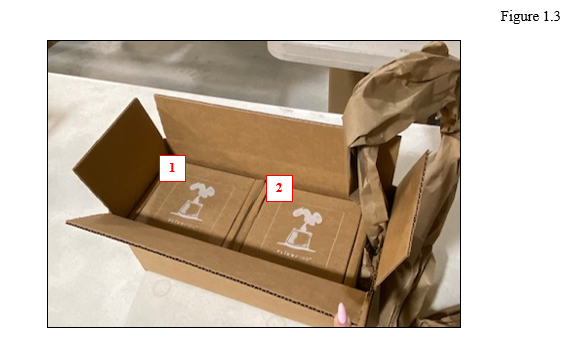
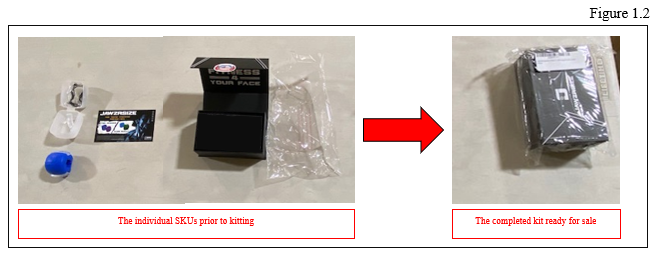
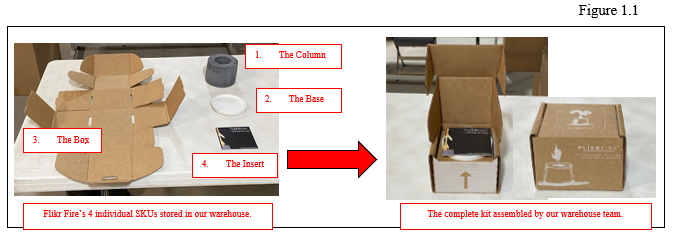
Kitting means you send us individual components (let’s say a coffee mug, a packet of beans, and a stirrer), and we physically combine them into one packaged unit. We then assign this kit a brand-new SKU in our system and store it as a single product on our shelves.
Think of it this way: you’re asking us to manufacture a new product by assembling existing parts. We receive component inventory, build the kits, barcode them, and store them as finished goods. When an order comes in for that kit SKU, we just pick one unit off the shelf—same as any other product.
Kitting works best when you know you’ll sell 500+ units of a specific combination per month. Setup typically takes 2–3 business days, and we charge between $0.50–$2.00 per unit assembled, depending on complexity and volume.
What Bundling Actually Is
Bundling is lighter touch. You maintain separate SKUs in your system, but you tell us “whenever someone orders bundle #5, pick item A, item B, and item C together and pack them in the same box.” We don’t create new inventory or build anything ahead of time.
Bundling lives in your order data. When an order arrives labeled as a bundle, our team picks multiple SKUs during the normal picking process and combines them at pack time. No new product record, no advance assembly, no extra storage space.
Bundling is ideal for smaller volumes, test combinations, or seasonal offerings. There’s no setup fee, but we do charge a small bundling fee (typically $0.15–$0.50 per bundle) on the line item when we fulfill it.
Why This Distinction Actually Matters for Your Business
The choice between kitting and bundling changes three things: your inventory accuracy, your fulfillment speed, and your per-unit costs.
Inventory visibility: With kitting, once components are assembled into a kit SKU, your system shows kit inventory, not component inventory. If a kit isn’t moving, you have locked capital in assembled goods. With bundling, you always see component stock levels separately, giving you more granular control.
Fulfillment speed: Kits pick and pack in one motion—we grab one unit from the shelf. Bundles require us to locate and pull multiple items during picking. For standard orders, this adds 30–90 seconds per bundle. During peak season (November–December), this compounds across thousands of orders.
Cost per unit: Kitting costs more upfront (assembly labor + storage space for finished goods) but scales well at volume. Bundling costs less initially but adds a small fee to every single order. If you’re shipping 10,000 bundles per month, kitting becomes cheaper. At 200 bundles per month, bundling is the right call.
Returns and damage: When a customer returns a kit, the entire unit comes back and we credit you for one kit SKU. With bundles, individual items can be returned separately, making partial refunds more common and reconciliation messier.
How Kitting and Bundling Actually Work in Our System
Let’s walk through each process step by step.
Kitting workflow:
- You send us component inventory (mugs, beans, stirrers).
- You submit a kitting request with the kit SKU, component list, and quantity to build.
- Our warehouse team receives the request and schedules assembly (2–3 business days lead time).
- We assemble, label with the kit barcode, and store in our racking system.
- Your system reflects component inventory as “consumed” and kit inventory as “available.”
- Orders for the kit SKU pick and ship normally.
Bundling workflow:
- You maintain all SKUs separately in inventory.
- You create a bundle configuration in your Fulfyld account (specify which SKUs belong together).
- When an order comes in with that bundle code, our system flags it for bundling during picking.
- Pickers locate each component SKU and place them together in the same box.
- Individual inventory levels decrease as normal.
- The customer receives everything in one shipment.
Common Issues and How to Troubleshoot Them
Kitting issue: We’re running out of kit inventory unexpectedly. This usually means one component SKU is out of stock, so we can’t build new kits. Check your component reorder levels. If component A has 50 units but you need 100 to reach your kit target, we’re blocked. Solution: increase safety stock on bottleneck components, or reduce your monthly kit build quantity.
Bundling issue: Orders are shipping with missing bundle items. This happens when pickers miss an item during multi-pick bundling, especially during high-volume periods. We flag this immediately and reship missing items at no charge, but prevention matters: confirm your bundle configuration is clear in our system and alert us to complex bundles so we can flag them for extra verification.
Either option: I’m not sure which one I should use. Ask yourself: (1) Do I expect 500+ units of this combo per month? If yes, kit it. If no, bundle it. (2) Do I want to test this combination before committing? Bundle it. (3) Am I building seasonal gifts that’ll sit for months? Bundle it to avoid dead inventory.
When to Contact Fulfyld Support
Reach out if you’re unsure whether kitting or bundling makes sense for your specific product mix, if you want a cost comparison for a particular scenario, if you’re experiencing recurring fulfillment issues with bundles, or if you want to convert existing kits into bundles (or vice versa).
Still stuck? Contact us at support@fulfyld.com or through your account dashboard, and we’ll review your volume and margins to recommend the right approach.